CI/CD pipelines are often associated with application delivery, but the same principles apply to infrastructure as well. As environments become more dynamic, manual validation of components like NetScaler becomes difficult to scale and inconsistent in results. This blog walks through how firmware validation can be moved into a repeatable pipeline-driven process, using automated deployment, configuration, and regression testing to create consistent, measurable outcomes.
Pipeline-Driven Firmware Validation
CI/CD pipelines are typically associated with application builds, but their core strengths — automation, repeatability, validation, and reporting — are equally powerful for infrastructure testing.
Moving firmware validation into a pipeline introduces:
- Consistency across every test run.
- Automated reporting and artifact retention.
- Reduced human error.
- Parameterized execution.
- Clear visibility into outcomes.
Instead of manually deploying and checking devices, firmware testing becomes structured, measurable, and repeatable.
The following tree represents an example configuration of services that are load balanced and presented to end users through the NetScaler. Each service corresponds to a backend application or server instance that participates in the load balancing pool. The NetScaler distributes incoming traffic across these services according to the configured load balancing policies.
│
  ├── cs_vsrv_https ─── SSL :443, clttimeout=180
  │   │
  │   ├── PROFILES
  │   │   ├── TCP: tcp_prof_web ── CUBIC, SACK, ECN, HTTP/2, keepalive=300s
  │   │   ├── HTTP: http_prof_web ── drop invalid, HTTP/2, WebSocket
  │   │   └── SSL: ns_default_ssl_profile_frontend ── TLS 1.2+1.3, HSTS, AEAD-only ciphers (×4)
  │   │
  │   ├── CERTIFICATE: wildcard.lab.local → chain → lab-ca
  │   │
  │   ├── CS POLICIES (hostname → LB vserver)
  │   │   ├── P100: api.lab.local → lb_vsrv_api
  │   │   ├── P110: static.lab.local → lb_vsrv_web
  │   │   └── P120: app.lab.local → lb_vsrv_web
  │   │
  │   ├── RESPONDER POLICIES (REQUEST)
  │   │   ├── P25:  CORS preflight → 204 No Content
  │   │   └── P30:  Bot blocking → 403
  │   │
  │   ├── REWRITE POLICIES (REQUEST) ── 4 policies
  │   │   ├── XFF, X-Real-IP, X-Forwarded-Proto, X-Request-ID
  │   │
  │   ├── REWRITE POLICIES (RESPONSE) ── 17 policies
  │   │   ├── Security headers (×6): XFO:DENY, nosniff, XSS, referrer, permissions, CSP
  │   │   ├── Strip headers (×3): Server, X-Powered-By, X-AspNet-Version
  │   │   ├── Extra headers (×3): X-Download-Options, Cross-Domain-Policies, Cache-Control
  │   │   ├── CORS headers (×5): origin, methods, headers, credentials, max-age
  │   │
  │   └── COMPRESSION POLICIES (RESPONSE) ── 5 policies
  │       └── text/*, JSON, JavaScript, XML, SVG
  │
  ├── cs_vsrv_http ─── HTTP :80, clttimeout=60
  │   └── P100: → 301 redirect to https://
  │
  ├── LB VSERVERS
  │   ├── lb_vsrv_web ── HTTP, ROUNDROBIN, cookie persist
  │   │   └── sg_web_http ── srv_host01:80, srv_os:80, mon: HTTP HEAD / → 200
  │   │
  │   ├── lb_vsrv_api ── HTTP, LEASTCONN, source IP persist
  │   │   └── sg_web_http (shared with lb_vsrv_web)
  │   │
  │   └── lb_vsrv_web_ssl ── SSL, ROUNDROBIN, source IP persist
  │       └── sg_web_https ── srv_host01:443, srv_os:443, mon: HTTP-ECV → "200 OK"
  │
  VIP: 10.0.1.115 (var.vip_tcp)
  │
  └── lb_vsrv_tcp ── TCP :8080, LEASTCONN, source IP persist
      └── sg_tcp_generic ── srv_host01:8080, srv_os:8080, mon: TCP connect
  │
  VIP: 10.0.1.125 (var.vip_dns)
  │
  └── lb_vsrv_dns ── DNS :53, ROUNDROBIN
      └── sg_dns ── srv_host01:53, srv_os:53, mon: DNS built-in
3 VIPs, 6 vservers, 4 service groups, 2 backends, 42 policies bound to the main CS vserver.
The Pipeline
The Azure DevOps pipeline is structured as a multi-stage workflow running on a self-hosted Linux agent (the KVM host). It is manually triggered with configurable variables that define the baseline and candidate firmware images.
Each run executes in a controlled sequence:
- Setup – Validate prerequisites, verify tool versions, and prepare the environment.
- Deploy Baseline – Deploy and configure the baseline VPX.
- Deploy Candidate – Deploy and configure the candidate VPX.
- Regression Testing & Reporting – Execute validation and generate a report.
- Cleanup – Remove all deployed resources and temporary files.
Every run is isolated, repeatable, and leaves the host in a clean state.
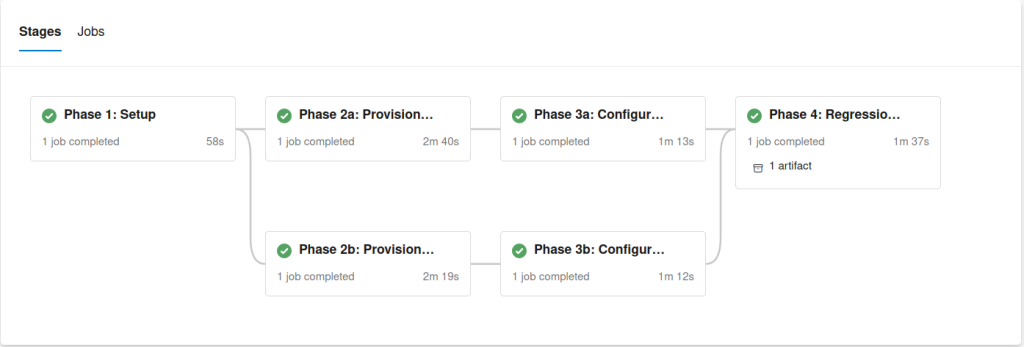
Azure DevOps integrates with GitHub, allowing this project to be version-controlled and centrally stored. Changes to Terraform modules, scripts, or pipeline definitions are tracked over time.
Although Azure DevOps is used here, GitHub Actions or other git-based products could accomplish the same orchestration with minimal structural changes.
Each step can include verbose logging to quickly identify and troubleshoot unexpected results. For example, setting up a full configuration with Terraform from scratch takes minutes and is idempotent, allowing for incremental changes.
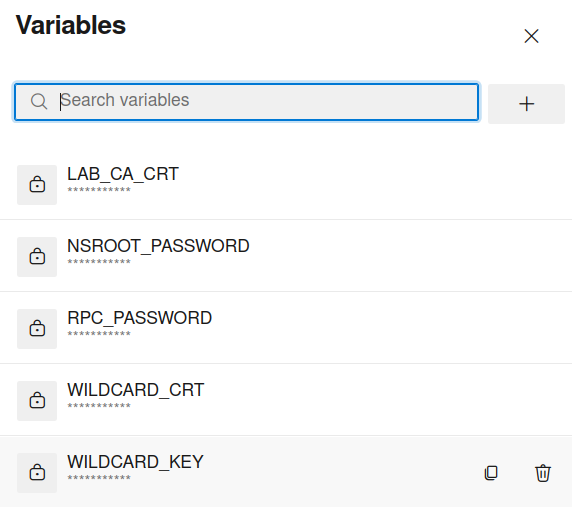
Storage of credentials and sensitive information to be used in the pipeline has been included in Azure DevOps variables in the pipeline itself. While this testing is for a development environment and is meant to be thrown away, any real-world application would benefit from other Secrets management solutions.
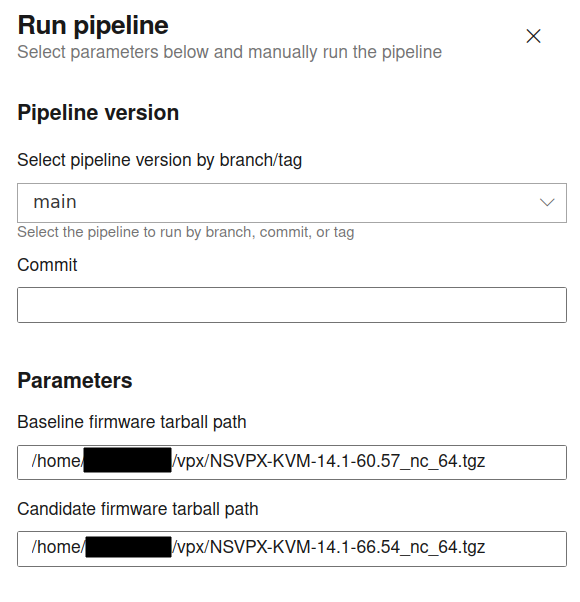
One of the strengths of this approach is runtime flexibility.
Pipeline variables allow you to:
- Switch firmware versions instantly.
- Modify deployment parameters.
- Adjust IP addressing.
- Enable verbose logging.
- Control testing behavior.
Changing firmware builds requires only updating a variable and re-running the pipeline.
This eliminates the need for rebuilding test environments manually and significantly shortens validation cycles.
Many Ways to Accomplish The Same Thing
Regression testing generates structured output that feeds into a simple HTML report. The report is saved as a pipeline artifact, providing:
- Persistent test results.
- Historical comparisons.
- Visibility into pass/fail metrics.
- Downloadable logs for further analysis.
Artifacts create a traceable history of firmware validation without requiring external tooling. I wanted a visual representation to quickly glance at the results, but a diff report can accomplish the same for configurable items.
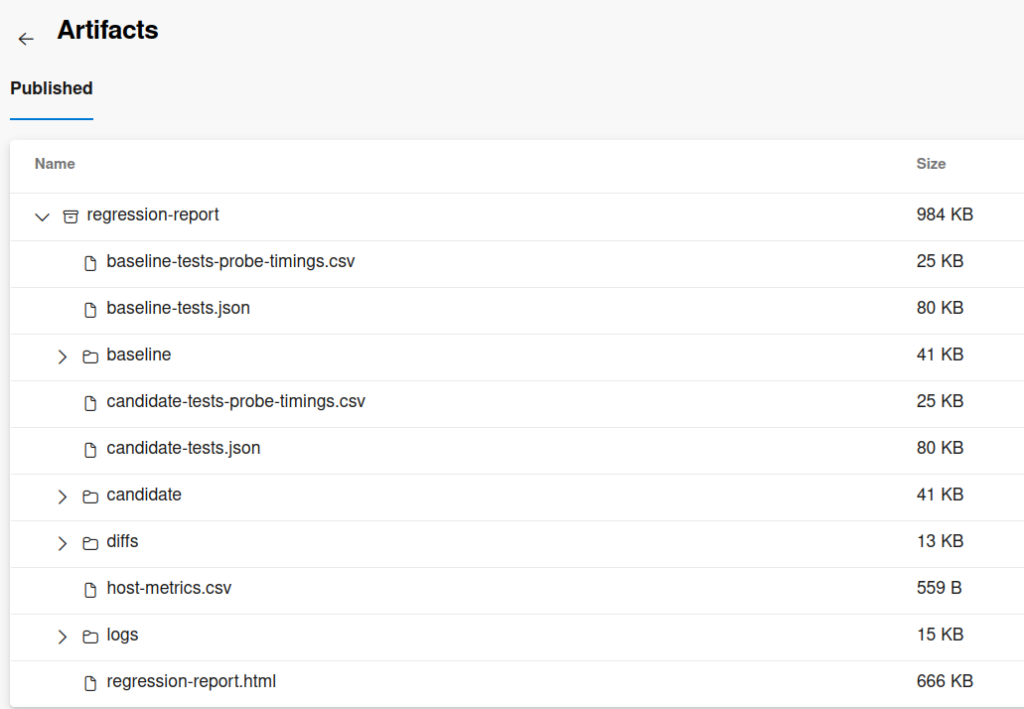
While this pipeline is not intended for production and is merely a sample of what is possible, it can collect a lot of working data.
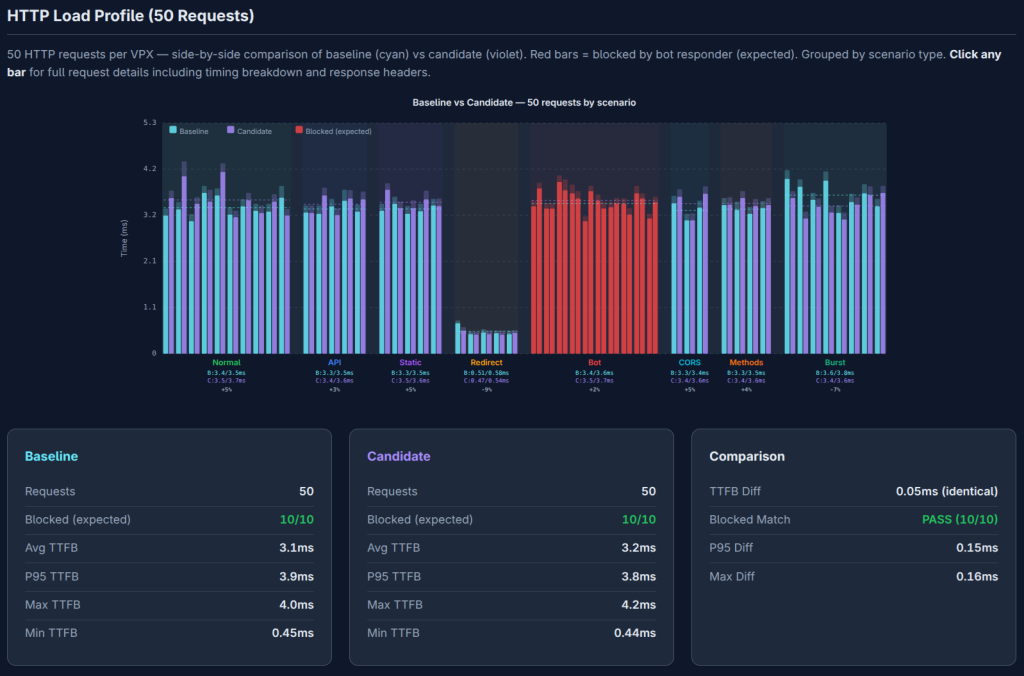
A simple HTML page was generated from the data found in the artifacts to visualize areas to investigate further. Visually parsing 100 HTTP requests sent during the pipeline provides a quick way to validate that the objects created above were successfully configured and that the NetScalers’ performance is as expected. Apps, API and redirects are successfully starting to send data while bot policies are blocking a few combinations of requests.
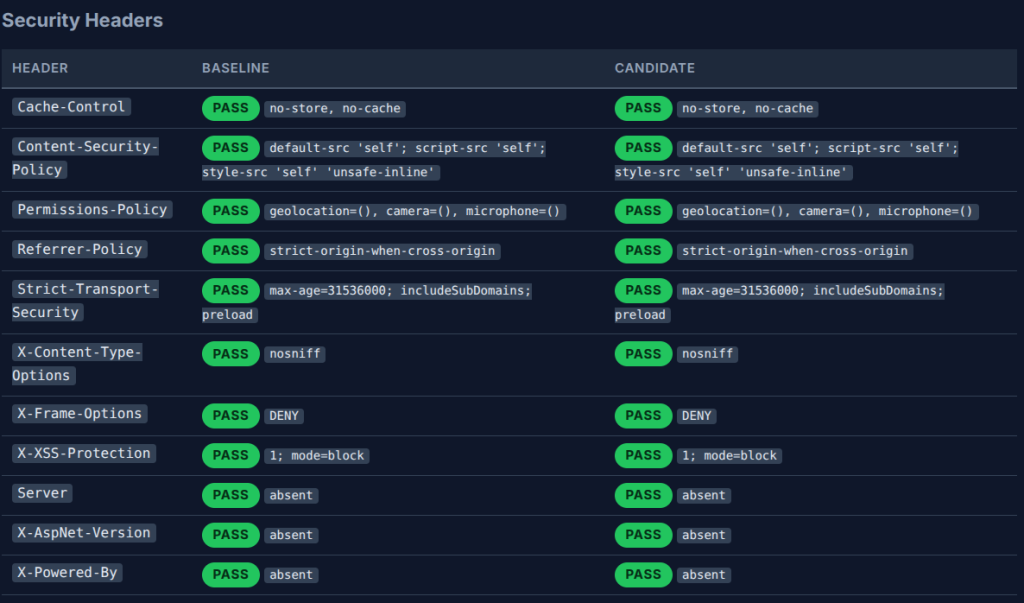
The application of unit tests based on what is configured allows for a highly customizable test specifically fit for the purpose. Having an SSL cert that is installed correctly and is linked, or any system logs that are unexpected, can be quickly viewed and further acted on. When properly maintained, this additional observability can detect areas that should be investigated further.
Parsing the output of commands, either through the CLI or Nitro API or other mechanisms, allows for multiple ways to determine the state of the running config and what can be present after a reboot. Default values and actual state information or health monitors succeeding would be difficult to determine from configuration management tools solely if that information were requested.
Extensibility
The pipeline is modular and intentionally simple in structure. While this implementation contains four primary phases, it can be extended to include:
- Additional regression tests.
- Performance benchmarking.
- Scheduled firmware validation runs.
- Approval gates.
- Notification integrations.
- Multi-environment promotion workflows.
Anything that can be programmatically deployed and validated can be incorporated into the pipeline.
Final Thoughts
This project demonstrates how CI/CD pipelines can extend beyond application builds and into network infrastructure validation. By automating NetScaler VPX deployment, configuration, regression testing, and cleanup, firmware evaluation becomes predictable, measurable, and repeatable.
The broader takeaway is not just about NetScaler. It is about shifting traditionally manual infrastructure processes into automated, version-controlled pipelines. When infrastructure is treated as code, validation becomes scalable, testing becomes consistent, and environments become disposable rather than fragile.
This approach reduces operational friction, shortens testing cycles, and creates a repeatable foundation for future automation initiatives. Although firmware upgrades are merely one aspect of maintaining infrastructure, having CI/CD pipelines can provide a separate way to troubleshoot existing issues and provide another means to mitigate issues.
If you are exploring how to bring this level of automation into your NetScaler or broader infrastructure strategy, we can help assess where pipelines fit and how to implement them in a way that aligns with your environment. Contact our experts today to get started.