In 2025, I attended several excellent conferences, and a few sessions and conversations stand out:
- IGEL Now & Next included a security roundtable that reinforced how quickly the endpoint and identity security landscape is changing.
- MMS Music City featured several standout sessions that underscored the importance of Microsoft security modernization.
- Workspace Ninjas included sessions on how enterprise environments should approach endpoint management, security, and modern authentication.
The common themes were security modernization, authentication flows, unused Microsoft 365 entitlements, endpoint posture, cloud adoption, and the continued shift away from legacy trust models.
Collectively, these areas can help organizations move from reactive security improvements to an architecture in which identity, device health, application sensitivity, and risk determine access decisions.
Many organizations already have access to the technologies to begin addressing these risks via existing Microsoft 365 and Entra entitlements; the challenge is more often adoption, architecture, and operational readiness. For example, check out my colleague Andre Nguyen’s blog that details how to integrate Microsoft Defender, Intune, and Entra to enable real-time endpoint device risk assessment, compliance enforcement, and automated threat response.
Authentication is one place where this gap most often appears, and the following are key indicators that an organization’s authentication model has not fully caught up with today’s threat landscape:
- Single-factor authentication flows still exist.
- Users still know and regularly type their passwords.
- Internal applications still accept username and password as sufficient proof of identity.
- VPNs, VDIs, trusted subnets, or managed devices are still considered reasons to relax authentication requirements.
- Helpdesk recovery still begins with a password reset.
- Zero Trust authentication is still described primarily as a user inconvenience rather than a security architecture requirement.
The Signal: Single-Factor Authentication Still Exists
A clear indication that an environment is using an older trust model is its continued reliance upon single-factor authentication.
This is not always obvious at first glance. An organization may have adopted modern identity controls in some places, but it has not fully eliminated the assumption that a password can serve as sufficient proof of identity. For example, if the answer to any of the following questions is yes, the organization still has password-centered authentication flows:
- Can a user access a critical internal application with only a username and password?
- Can a VPN or VDI session create broad access to internal resources after a weak authentication event?
- Can an administrative tool, jump server, management console, or legacy workflow still be reached without strong authentication?
- Can the Helpdesk restore access by resetting a password and sending the user back through the same password-centered flow?
- Can a shared workstation or internal line-of-business application still operate on the assumption that being “inside the network” is sufficient?
This matters because attackers only need one useful door that still accepts a reusable secret. If a password is still sufficient to access something important, it can be phished, guessed, sprayed, reused, harvested from another system, or recovered through social engineering.
Rather than solve every password problem at once, the first step toward authentication modernization is to make remaining single-factor authentication flows visible.
Users Knowing Their Passwords Is a Symptom
There is a simple test to indicate passwordless maturity: do users still know their passwords?
If users regularly type passwords, those passwords remain exposed to phishing, reuse, shoulder surfing, browser capture, malicious prompts, fake portals, and social engineering. Even strong passwords and password managers do not fully solve the problem if critical workflows still accept reusable secrets.
A passwordless strategy should be understood as more than a sign-in convenience, as it reduces the number of instances in which a reusable secret is presented, accepted, cached, reset, or relied upon.
The same principle applies to support processes. If account recovery still begins with a password reset, the organization has not removed the password from the center of the authentication model. An organization may have added MFA around a password, but the password remains the recovery anchor.
That is risky because recovery workflows are high-value targets. If an attacker can convince a support engineer to reset a password, bypass a registration control, or re-establish access through weak proofing, the strength of the normal sign-in experience may not matter.
For these reasons, the objective is to reduce how often users need passwords, where passwords are accepted, and what passwords can unlock. Modern authentication should make passwords less visible to users and less valuable to attackers. That begins by identifying the places where users still type passwords because the environment requires users to do so.
The Trusted Internal Network Is Not an Authentication Method
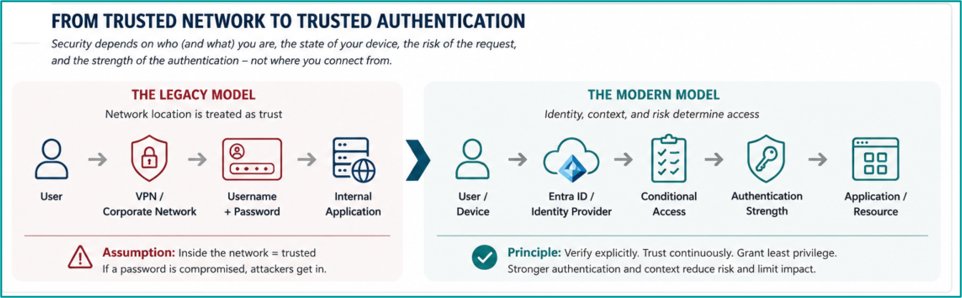
The trusted internal network remains one of the most persistent barriers to authentication modernization. Most IT environments were traditionally designed around the concept that access from inside the network was materially different from access outside the network. That assumption shaped application design, remote access policy, administrative workflows, and support procedures. External access was challenged, whereas internal access was trusted.
In today’s reality, network location is not an authentication method. A corporate subnet, VPN session, managed device, VDI session, etc., can all be useful signals, but none of those should make username and password sufficient by themselves. Network context should inform access decisions, not replace authentication decisions. Treating trusted subnets, VPN connectivity, VDI access, or managed devices as criteria to relax authentication requirements exposes vulnerabilities that attackers can exploit.
Modern authentication should evaluate the user, device, application, session, location, risk, and required authentication strength. The internal network should not be a criterion for MFA exemption; rather, it is one of the first places to look for authentication modernization debt.
Zero Trust Authentication Is Not the Inconvenience; Poor Design Is
Another common barrier to authentication modernization is the perception that Zero Trust creates unnecessary friction for users.
That concern is understandable, as poorly designed authentication policies can create friction; for example, users may be prompted too often or challenged inconsistently. But that is not an argument against Zero Trust authentication; rather, it is an argument against poor design.
Zero Trust authentication should not mean challenging every user at every moment for every application. Instead, the user, device, application, session, location, sign-in behavior, and authentication method should all contribute to the access decision. The goal is better trust decisions, not more prompts.
A well-designed authentication model should often feel less disruptive than a legacy model. This is especially important in environments wherein security controls are often judged by user experience. If Zero Trust is introduced as a series of disconnected prompts, users will experience it as an obstacle.
Modernization should reduce that inconsistency. The best authentication strategy applies the right challenge at the right time, using the right method, for the right resource.
MFA is the Baseline, Not the Destination
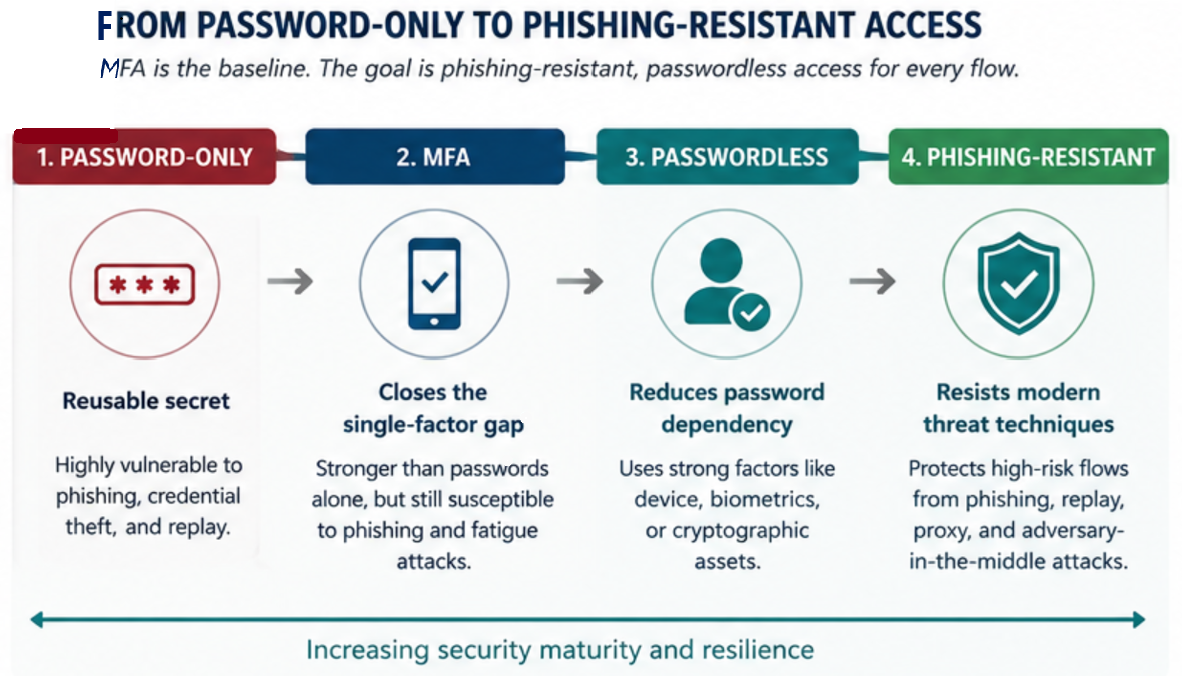
If single-factor authentication still exists in an environment, MFA is the obvious first correction; however, MFA should be considered the baseline, not the end state.
MFA is often treated as a single security control, but not all authentication methods are equally secure. SMS, voice calls, one-time passcodes, push notifications, app-based approvals, Windows Hello for Business, FIDO2 security keys, certificate-based authentication, and passkeys each provide different levels of protection against modern identity attacks.
Some methods reduce risk compared to passwords alone, but can still be phished or socially engineered. Some methods improve user experience but may not be appropriate for every privileged scenario. Some methods provide stronger protection since they are based upon cryptographic authentication and are resistant to replay and adversary-in-the-middle attacks.
A better authentication modernization model enforces the required authentication strength for the access flow; i.e., the solution is not simply “MFA everywhere” but rather requires the right authentication method for the right access flow. This is the shift organizations need to make. For example:
- MFA closes the single-factor gap.
- Passwordless reduces the operational reliance upon passwords.
- Phishing-resistant authentication protects the access paths wherein stolen credentials, copied codes, or proxied sign-ins should not be sufficient.
Where to Start: Find the Flows Where Passwords Are Still Sufficient
The first step in authentication modernization is visibility: identify the authentication flows where a password is still sufficient, where weak MFA is still accepted, or where trusted network assumptions still relax security requirements.
The goal is to reduce the number of important places where a password is sufficient. Start with a simple set of questions such as:
- Can users access any internal applications with only a username and a password?
- Can VPN, VDI, or published application access create broad internal reach after a weak authentication event?
- Can administrators access privileged tools, management consoles, security platforms, or identity systems without phishing-resistant authentication?
- Can users register or change authentication methods without strong proof of identity?
- Does Helpdesk recovery still begin with a password reset?
- Are trusted subnets, corporate devices, or virtual desktop sessions used to justify bypassing stronger authentication?
- Do users still type their passwords every day?
For some authentication flows, the first step may be MFA enforcement. For others, it may be modernizing an internal application so it can participate in Conditional Access. Some users may be good candidates for Windows Hello for Business. Some scenarios may require FIDO2 security keys. Some onboarding and recovery flows may need a Temporary Access Pass. Some sensitive applications and privileged roles may need phishing-resistant authentication enforced via authentication strengths.
Deciding the solution comes after the access flow is understood. Modernization should begin with the access paths that pose the greatest risk, and once those access flows are understood, organizations can begin matching them with the appropriate modern authentication methods. Examples include:
- Privileged access.
- Internal applications containing sensitive data.
- VPN and VDI flows that provide broad access.
- Helpdesk recovery processes.
- Security information registration.
- Administrative tools.
- Shared workstation scenarios.
- Legacy applications that bypass modern identity controls.
The Road Ahead
The threat landscape has evolved significantly, and many of the capabilities needed to respond are already available through existing Microsoft 365 and Microsoft Entra entitlements.
Some of the clearest signs that an environment is ready for modernization are easy to spot: passwords still unlock critical resources, trusted network locations still reduce authentication requirements, or users still rely on passwords as their primary sign-in method.
The next step is not to eliminate passwords overnight, but to identify where they remain the weakest link and replace them with authentication methods that align with each user’s role, device, application, and risk profile.
In the next post in this series, we’ll examine the Microsoft Entra authentication methods that make this transition possible, including Temporary Access Pass, Microsoft Authenticator, Windows Hello for Business, FIDO2 security keys, passkeys, certificate-based authentication, external MFA, and Conditional Access.
If you’re planning to modernize authentication or move toward a password-resistant environment, Ferroque Systems can help. Our consultants have decades of experience designing, implementing, and securing Microsoft identity and EUC environments for enterprise, commercial, and government organizations. Whether you’re evaluating passwordless authentication, strengthening Conditional Access, or building a broader Zero Trust strategy, we can help you choose the right approach for your environment.