Introduction
When we think about endpoint security, our minds tend to go immediately to physical Windows laptops and desktops. But there is another category of Windows endpoint that is sometimes overlooked in this discussion: the virtual desktops and session hosts that users interact with every day.
Whether that desktop is delivered through Citrix, Microsoft AVD or RDS, Omnissa Horizon, Parallels RAS, Amazon WorkSpaces, a Cloud PC, or something else entirely really does not matter. Nor does it particularly matter whether the underlying operating system is a single or multi-user Windows server or desktop OS. If users interactively log into it to browse the web, open email attachments and documents, run applications, access external content, redirect devices, and perform their day-to-day work, it should be treated as an endpoint from a security perspective with all the scrutiny and isolation trappings that go along with it.
In fact, they represent one of the most exposed parts of an organization’s attack surface. End-user systems routinely interact with email, web content, downloaded files, external services, removable or redirected devices, and, of course, users themselves. Microsoft’s 2025 Digital Defense Report found that 28% of breaches investigated by Microsoft Incident Response began with phishing or social engineering, while modern attackers increasingly rely on stolen credentials and legitimate access rather than traditional malware. The point is not that every compromise starts at an endpoint, but that we should operate under the assumption that any endpoint could eventually become compromised. Source: Microsoft
This becomes particularly important in Active Directory environments because of a surprisingly common and overlooked administrative practice: allowing highly privileged accounts, including members of Domain Admins and Enterprise Admins, to log into these systems. If an account can control Active Directory, there is very little reason it should be authenticating to an end-user system that does not require those privileges in the first place.
This article looks at why keeping these privileged credentials away from end-user systems is important, the attack paths this helps mitigate, and how relatively simple Group Policy controls can enforce that separation. We will also look at complementary protections and concepts such as Credential Guard, Privileged Access Workstations (PAWs), and just-in-time (JIT) privilege elevation (such as AuthLite, CyberArk, etc.), including what risks they mitigate and, importantly, what risks they do not.
While the examples throughout this article focus heavily on end-user computing platforms and draw on post-mortem forensic investigations Ferroque has been brought into over the years where an end-user endpoint was ground zero, the underlying guidance applies to Windows member servers more broadly. The scope is also specifically Active Directory domain-joined systems, including Microsoft Entra hybrid joined devices. Pure Entra joined endpoints use a different identity and privileged access model and are outside the scope of the Domain Admin and Enterprise Admin controls discussed here.
Context, Risk, and Attack Paths
The fundamental problem is not that Domain Admin credentials are inherently insecure. The problem is allowing credentials capable of controlling the entire domain to be used on systems with a much larger and less controlled attack surface, where attackers may have opportunities to hijack privileged authentication and dramatically escalate the scope of a compromise to the entire domain and its objects (users, computers).
Attackers rarely begin an intrusion with Domain Admin privileges. They establish an initial foothold somewhere else and work their way up. An attacker who compromises a user’s laptop, VDI, session host, or another Windows member server may initially have access only to that system and the privileges of the compromised user. That is obviously bad, but it is still a very different problem from losing control of the AD domain.
Depending on the Windows configuration, authentication method, and security controls in place, privileged authentication can leave behind or expose credential material that an attacker may be able to steal or abuse. This does not necessarily require the Domain Admin to still be logged in when the system is compromised. Previous administrative logons can leave cached credential information or other authentication artefacts behind, while an attacker already present on the system may have even greater opportunities to target credentials, authentication tokens, Kerberos tickets, or the privileged session as it is being used. Pass-the-Hash is one well-known example, where stolen NTLM credential material can potentially be reused to authenticate as the victim without knowing their password. Pass-the-Ticket similarly involves stealing and reusing Kerberos authentication material. In other cases, an attacker may attempt to capture credentials as they are entered or simply abuse the privileges of an active administrative session.
The exact mechanics vary, and modern Windows protections have closed or substantially reduced many historical credential-theft techniques. We could spend an entire article discussing NTLM hashes, Kerberos tickets, LSASS, credential caching, and which protections apply to each. That isn’t really the point.
Whether the attacker compromises the system before, during, or after the privileged administrator uses it, allowing that authentication creates an opportunity that did not need to exist in the first place.
This is the basic principle behind administrative tiering. Systems and identities capable of controlling Active Directory occupy the highest level of trust, while ordinary member servers and endpoints sit below them. Higher-privileged credentials should not be exposed to lower-trust systems. In short, an account with Domain Admin or Enterprise Admin rights has no business logging into end-user endpoints let alone the vast majority of servers. Convenience and lax security controls are risks.
A compromised endpoint might give an attacker control of an endpoint. A compromised Domain Admin account can give them a path toward control of the domain. Rather than attempting to defend against every possible method of stealing or abusing a privileged credential, the safer approach is to prevent unnecessary privileged authentication to the system in the first place.
Tiering computers and administrative accounts within Active Directory is not a new concept, and many well-managed enterprise domains use some form of this architecture. For established environments where introducing a comprehensive tiering model would be a significant undertaking, there are still relatively simple ways to establish a basic level of separation. At a minimum, members of Domain Admins and Enterprise Admins can be prevented from logging into systems other than Domain Controllers and the limited set of systems legitimately required to administer Active Directory.
The concept is straightforward: if a system has no role in administering Active Directory, Domain Admins have no business logging into it.
Restricting Domain Admin Logons with Group Policy
Fortunately, implementing a basic restriction does not require redesigning the entire administrative model of an established Active Directory environment. Microsoft has long recommended using Group Policy to prevent members of the Domain Admins and Enterprise Admins groups from authenticating to workstations and member servers. Microsoft’s current guidance specifically recommends applying these restrictions through GPOs linked to workstation and member server OUs. Source: Microsoft Learn
The applicable settings are located under:
Computer Configuration > Policies > Windows Settings > Security Settings > Local Policies > User Rights Assignment
For both Domain Admins and Enterprise Admins, Microsoft recommends configuring the following rights:
- Deny access to this computer from the network
- Deny log on as a batch job
- Deny log on as a service
- Deny log on locally
- Deny log on through Remote Desktop Services
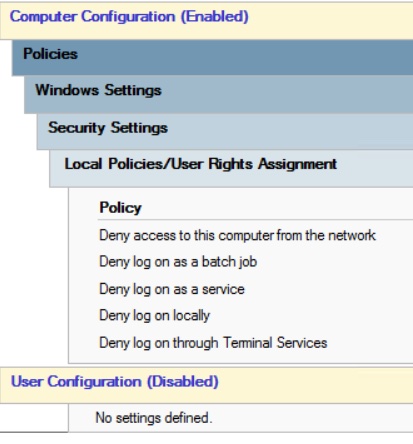
These settings should be configured in a dedicated GPO and linked to the OUs containing the applicable workstations and member servers. For our core use case, this would mean linking the GPO to the OUs containing VDIs and session host servers, ensuring its link order and inheritance result in the intended settings being applied.
It is tempting to configure only Deny log on through Remote Desktop Services, particularly when the immediate concern is administrators RDPing into servers. However, that addresses only one method of authentication. The objective is broader: Domain Admin and Enterprise Admin credentials should not be usable on these systems through interactive, network, service, or batch logon mechanisms. Microsoft recommends the complete set of restrictions for exactly this reason.
Careful GPO scoping is obviously important. Domain Controllers must not be included, nor should dedicated systems legitimately used to administer Active Directory, such as appropriately secured administrative jump hosts (PAWs). Microsoft’s guidance specifically calls out excluding such jump servers from the restrictive GPO.
These settings should also be tested before broad production deployment. Old Active Directory environments have a habit of containing interesting surprises. Technical debt and naive but well-meaning configurations are often abound. A forgotten scheduled task, service, management application, or script may have been configured years ago to run using a Domain Admin account because somebody decided that was easier than determining what permissions it actually required. Using Domain Admin as a service account is stupid, but that does not mean you will not find it.
Any odd Domain Admin dependencies, hopefully none, should be identified and remediated rather than treated as justification for leaving privileged authentication unrestricted. Better to uncover them, even if it means temporarily breaking something, than to let fear keep the environment in a vulnerable state. The risks are too high. That said, the likelihood of running into such dependencies should be quite low if deployment begins with end-user system OUs containing domain-joined physical or virtual endpoints, such as Windows desktops, laptops, VDIs, and session hosts.
What About Other Mitigating Controls?
At this point, a reasonable question is whether other security controls make these logon restrictions unnecessary. In most cases, the answer is no. Modern Windows and privileged access technologies can materially reduce the risk of credential theft, but they do not change the underlying principle that highly privileged identities should only be exposed where they are actually required.
Credential Guard is an important example. It uses virtualization-based security to isolate sensitive credential material, including NTLM password hashes and Kerberos Ticket Granting Tickets, from the normal operating system. This significantly raises the bar for common credential theft techniques such as Pass-the-Hash and Pass-the-Ticket. However, Microsoft explicitly documents limitations to its protection, and Credential Guard should be viewed as one layer of defence rather than permission to use Domain Admin credentials indiscriminately across endpoints and member servers. Source: Microsoft Learn
The Protected Users group provides another useful layer for privileged accounts. Members are prevented from authenticating with NTLM, have additional restrictions placed on credential caching and delegation, and receive shorter Kerberos ticket lifetimes. These protections can significantly reduce credential exposure, although Microsoft specifically recommends testing carefully before placing highly privileged accounts such as Domain Admins or Enterprise Admins into the group because the restrictions can break legitimate administrative workflows. Source: Microsoft Learn
Remote Credential Guard can also protect administrative RDP sessions by keeping the user’s credentials and credential derivatives off the remote system and redirecting Kerberos requests back to the originating device. It is an excellent control where applicable, but it only protects supported RDP scenarios and does not establish a general boundary preventing privileged accounts from authenticating to inappropriate systems. Source: Microsoft Learn
Privileged Access Management (PAM) platforms and technologies such as CyberArk and AuthLite can substantially reduce standing administrative privilege or control the circumstances under which privileged sessions are created. Just-in-time approaches can also limit how long elevated group membership exists. These are valuable controls, but privilege expiration does not mean that every previously issued Windows access token or Kerberos ticket is immediately invalidated, and the specific behaviour depends on how the solution implements elevation. PAM and JIT controls therefore reduce when and how privilege can be obtained, while logon restrictions independently control where those privileged identities and sessions are permitted to authenticate.
Microsoft’s current privileged access guidance makes essentially the same general point: there is no single technical control or PAM product that solves privileged access risk. Microsoft recommends combining identity controls, trusted administrative devices, protected access paths, least privilege, session security, and controls against lateral movement. Source: Microsoft Learn
For that reason, these technologies should be treated as complementary controls, not alternatives to restricting Domain Admin and Enterprise Admin authentication. The safest privileged credential on a potentially compromised endpoint is still the one that was never presented to it in the first place. Technologies such as PAM, JIT elevation, Credential Guard, and privileged access workstations should therefore be viewed as enhancements to, rather than replacements for, basic controls that prevent Domain Admins from logging into endpoints where those privileges are neither required nor appropriate.
Further Operational Considerations
The controls I’ve outlined above are straightforward, but implementing them successfully requires some consideration of how administrative access is currently performed. Administrators who manage member servers or client endpoints should generally have separate administrative identities for those systems rather than using Domain Admin accounts as a universal elevated credential. A Citrix administrator, for example, may require local or delegated administrative rights across VDAs, Delivery Controllers, StoreFront servers, or supporting infrastructure, but none of those responsibilities inherently require membership in Domain Admins.
If an organization that does not currently use an administrative tiering model wanted to introduce one, it could establish separate administrative boundaries and accounts for Tier 0, Tier 1, and endpoint administration. Note that this is not required to implement the basic “keep Domain Admins off systems users directly log into” guidance outlined earlier, but rather builds upon the same principle. A simplified administrative tiering structure might use Tier 0 administrator accounts for Domain Admin and other identity infrastructure administration, Tier 1 administrator accounts for member server administration, and separate administrative accounts where elevated access to user endpoints is required. Joe Admin in a small or mid-sized organization may therefore have three or more accounts to contend with, but this is a small price to pay for mitigating known exploitation vectors, not to mention reducing the likelihood of Joe Admin looking for another job in the event of a breach.
Evaluating Domain Admin use in your organization is also a good opportunity to identify services, scheduled tasks, scripts, or management applications running under unnecessarily privileged accounts. Domain Admin membership should never be used as a shortcut for determining the permissions a service account actually requires. That is frankly lazy and irresponsible. Least privilege is always the name of the game. Where these dependencies exist, they should be remediated rather than permanently exempting the affected systems from the restriction.
Appropriate exceptions will still exist. Domain Controllers obviously require administrative access, and organizations may maintain hardened jump hosts or privileged access workstations specifically for Active Directory administration. Break-glass procedures should also be considered so administrators retain a documented recovery path if the normal privileged access process fails.
Finally, Domain Admins and Enterprise Admins should not be interpreted as the complete list of accounts worth protecting. Other groups, delegated administrators, service accounts, and identities with control over critical Active Directory infrastructure may effectively possess equivalent privileges. In other words, the restriction should ultimately apply to the broader Tier 0 security boundary, not merely the two most obvious built-in administrative groups. Mature environments should therefore extend the same principle accordingly: credentials capable of controlling the identity plane should not be exposed to lower-trust systems.
There are also entire categories of Active Directory security we have intentionally not covered here, including appropriate audit logging for incident response and forensics, authentication hardening, legacy protocol reduction, service account hygiene, privileged group monitoring, and many other controls. Each of those could easily justify its own article, and much of it has already been covered extensively by people who spend far more of their lives thinking about Active Directory security than I do. For readers looking for a deeper but straightforward primer, I would strongly recommend seeking out Patrick Coble’s Active Directory security presentations.
Conclusion
Endpoint compromise is a reality that every organization has to plan for. The objective is not to assume that every Citrix VDA, AVD session host, laptop, member server, etc. is compromised, but to design administrative access so that the compromise of one of those systems does not unnecessarily provide a path toward control of Active Directory.
Modern protections such as Credential Guard, PAM, JIT elevation, privileged access workstations, and stronger authentication all make credential abuse more difficult and should absolutely be used where appropriate. None of them changes the fundamental principle of limiting where highly privileged identities are allowed to authenticate.
The technical implementation described here is relatively simple. The architectural principle behind it is even simpler: if a system has no role in administering Active Directory, Domain Admins have no business logging into it.
Now get cracking on your Domain Admin restriction GPO. And should you need expert assistance, you know where to find us.