
In complex identity environments such as higher education, it is common to encounter multiple Active Directory domains and varying authentication requirements across departments or institutions. While the goal may be to provide a unified access experience for users, achieving that outcome often requires careful planning around authentication routing, identity attributes, and backend resource validation.
In this case, the objective was to consolidate access through a single NetScaler Gateway while supporting multiple domains and Microsoft Entra ID authentication paths. The following sections walk through the design decisions, configuration approach, and key architectural considerations that made this possible.
The Scenario
The customer operated four Active Directory domains: Domain1, Domain2, Domain3, and Domain4. While Domain1, Domain3, and Domain4 shared a common Microsoft Entra ID tenant and SAML authentication path, Domain2 required a separate SAML path tied to a different tenant.
Although authentication for all users could be made to succeed, StoreFront required precise identity formatting to correctly enumerate applications. This meant the solution had to do more than authenticate; it also had to route and validate identities and normalize identities per-domain before enumeration. Overall, the solution needed to:
- Dynamically route users based upon their domain.
- Apply the correct SAML authentication action.
- Converge both SAML paths into a unified AAA layer.
- Apply a Traffic Policy before StoreFront enumeration.
- Avoid restructuring AD or consolidating Entra ID tenants.
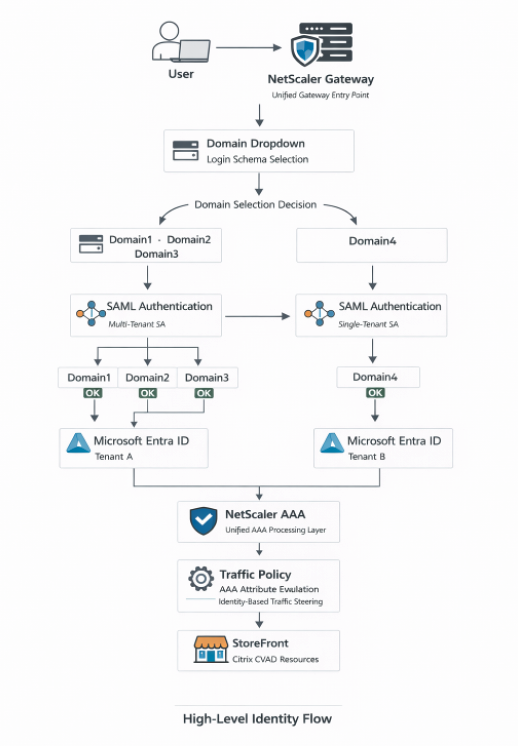
High-Level Identity Flow Diagram
This diagram illustrates how both SAML authentication paths ultimately converge into a single NetScaler AAA processing layer before moving through Traffic Policy evaluation and finally reaching StoreFront.
Technical Assessment
Login Schema Domain Dropdown
The first step in the architecture was to create a custom login schema that allowed users to select their domain at login, as outlined below.
In NetScaler firmware v14.1, the GUI path is: Configuration → Security → AAA – Application Traffic → Login Schema
The dropdown included:
- Domain1
- Domain2
- Domain3
- Domain4
Each value maps to a specific authentication policy via policy labels.
By default, the OnlyDomainDropdown.xml file supports only three options; thus, since our solution required four domains, the file had to be downloaded and modified manually.
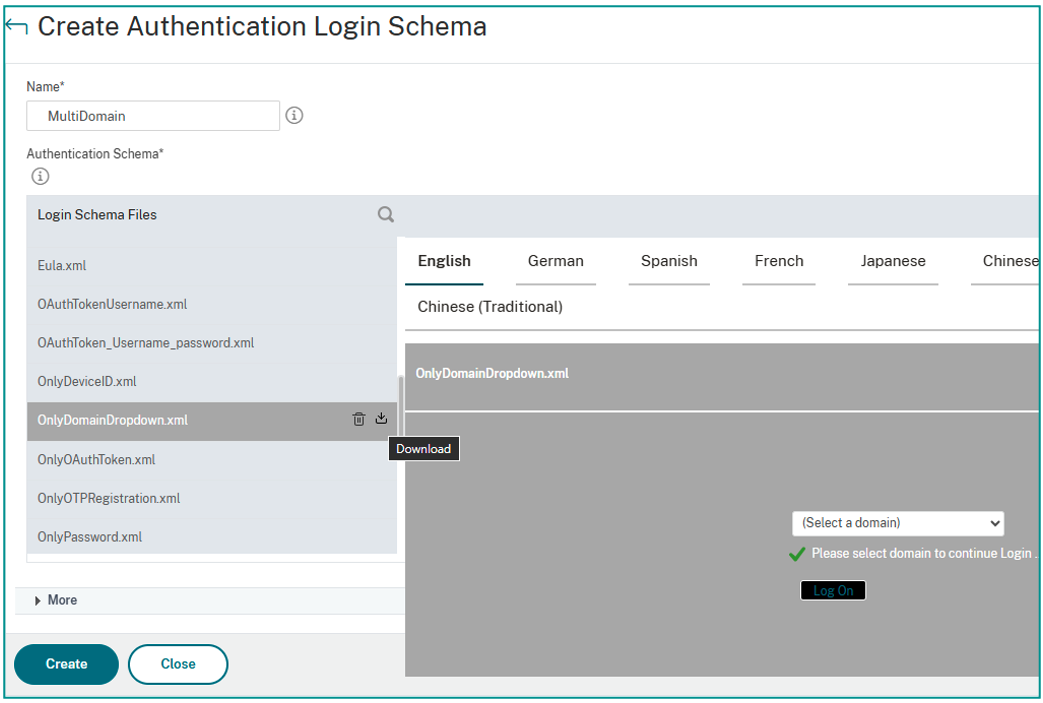
Inside the XML file, locate the <DisplayValue> sections and modify the default entries; for example:
From:
<Display>onlydomaindropdown_citrix.com</Display>
<Value>CITRIX.COM</Value>
To:
<Display>Domain1</Display>
<Value>DOMAIN1</Value>
If additional domains are required, copy an existing <DisplayValue> block, paste it appropriately within the XML structure, and update both the Display and Value entries.
After saving the file, upload it back into NetScaler, as follows:
- Navigate to Login Schema → Profiles.
- Add a new profile.
- Select “Upload” under Authentication Schema.
- Choose the modified file.
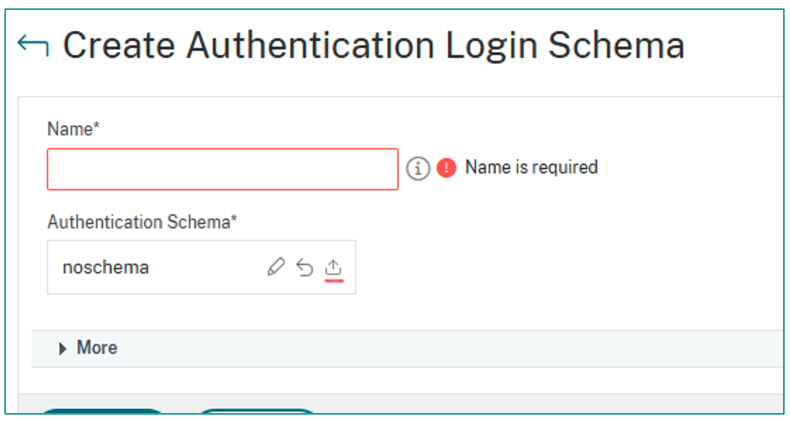
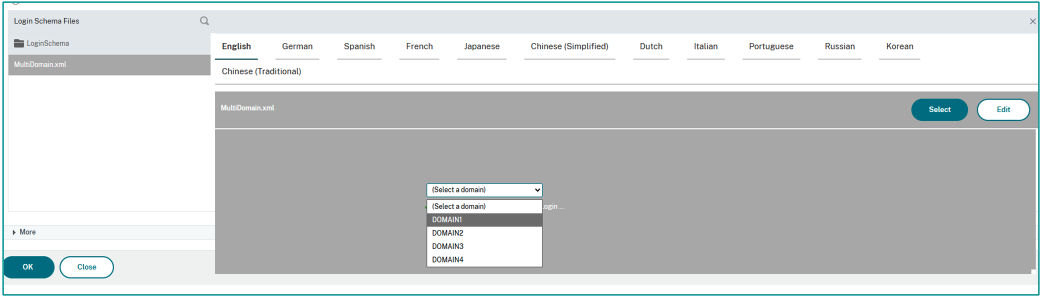
Once uploaded, the custom schema (e.g., “MultiDomain_Profile”) becomes selectable and usable. This dropdown became the routing mechanism for SAML authentication.
Policy / Advanced Authentication Flow Binding
Once domain selection is in place, the next step is to bind authentication policies based upon the selected domain.
In NetScaler firmware v14.1, the GUI path is: Security → AAA – Application Traffic → Policies → Authentication → Advanced Policies
The expression used to evaluate the selected domain was:
HTTP.REQ.BODY(500).AFTER_STR("domain").CONTAINS("DOMAIN1")
The value inside the CONTAINS() function must exactly match the value defined in the login schema dropdown; the policy will not trigger if the value is not an exact match (it is case-sensitive).
Each domain receives its own authentication policy that routes to the appropriate SAML authentication action.
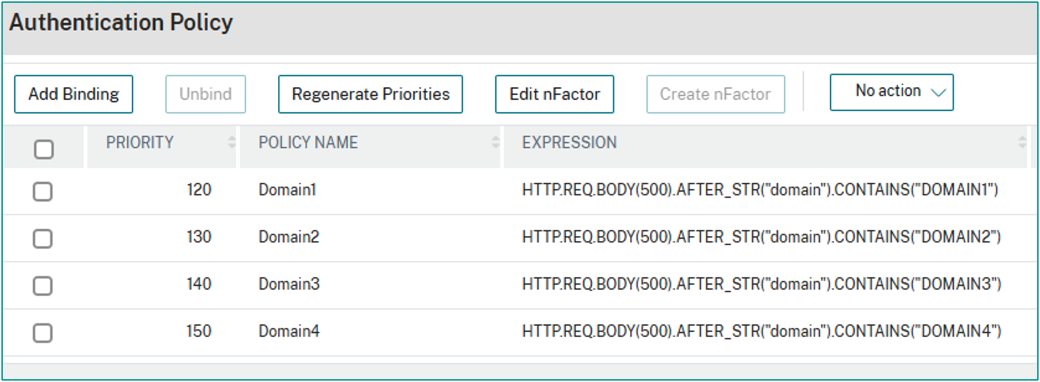
Although this example focuses on SAML, this logic works with any authentication type supported by NetScaler.
SAML Authentication and AAA Processing
Both SAML authentication paths — whether routed to Tenant A or to Tenant B — ultimately converge into the same NetScaler AAA virtual server (vServer).
In NetScaler firmware v14.1, the GUI path is: Security → AAA – Application Traffic → Authentication Virtual Servers
Within the AAA vServer:
- Bind the authentication policies.
- Use Advanced Policy bindings.
- Ensure priority ordering is correct.
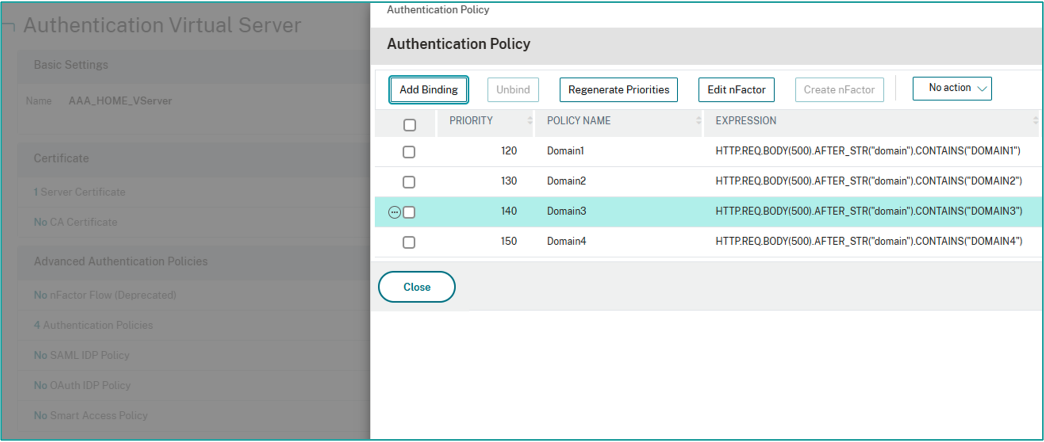
This blog will not go deep into SAML specifics here but note that attribute mapping may vary depending upon the customer’s environment. The key point is that regardless of tenant, authentication ultimately converges into a unified AAA processing layer.
Gateway Traffic Policy – Identity-Based Steering
Traffic Policies are evaluated after AAA and before StoreFront, making them ideal for identity normalization. In this deployment, Traffic Policy affected only Domain3, which shared a UPN pattern with Domain1, but required a different identifier for StoreFront. The differentiating value was present in AAA attribute 10.
Policy Expression:
AAA.USER.ATTRIBUTE(10).SET_TEXT_MODE(IGNORECASE).CONTAINS("@domain3.com")
SSO User Expression:
AAA.USER.ATTRIBUTE(10).BEFORE_STR("@")
This extracts the username portion (before “@”) and sends it to StoreFront, ensuring correct identity enumeration without:
- Modifying Active Directory.
- Rewriting HTTP traffic.
- Complex StoreFront customization.
Traffic Policy keeps the identity logic cleanly contained within AAA.
SAML Attribute Configuration
Within the SAML server configuration, attributes must be properly defined to match what Microsoft Entra ID sends.
In NetScaler firmware v14.1, the GUI path is: Authentication Policy → Configure Authentication SAML Server
Scroll down to attribute configuration and define the attribute name expected from the SAML assertion. Depending upon the domain, this could be:
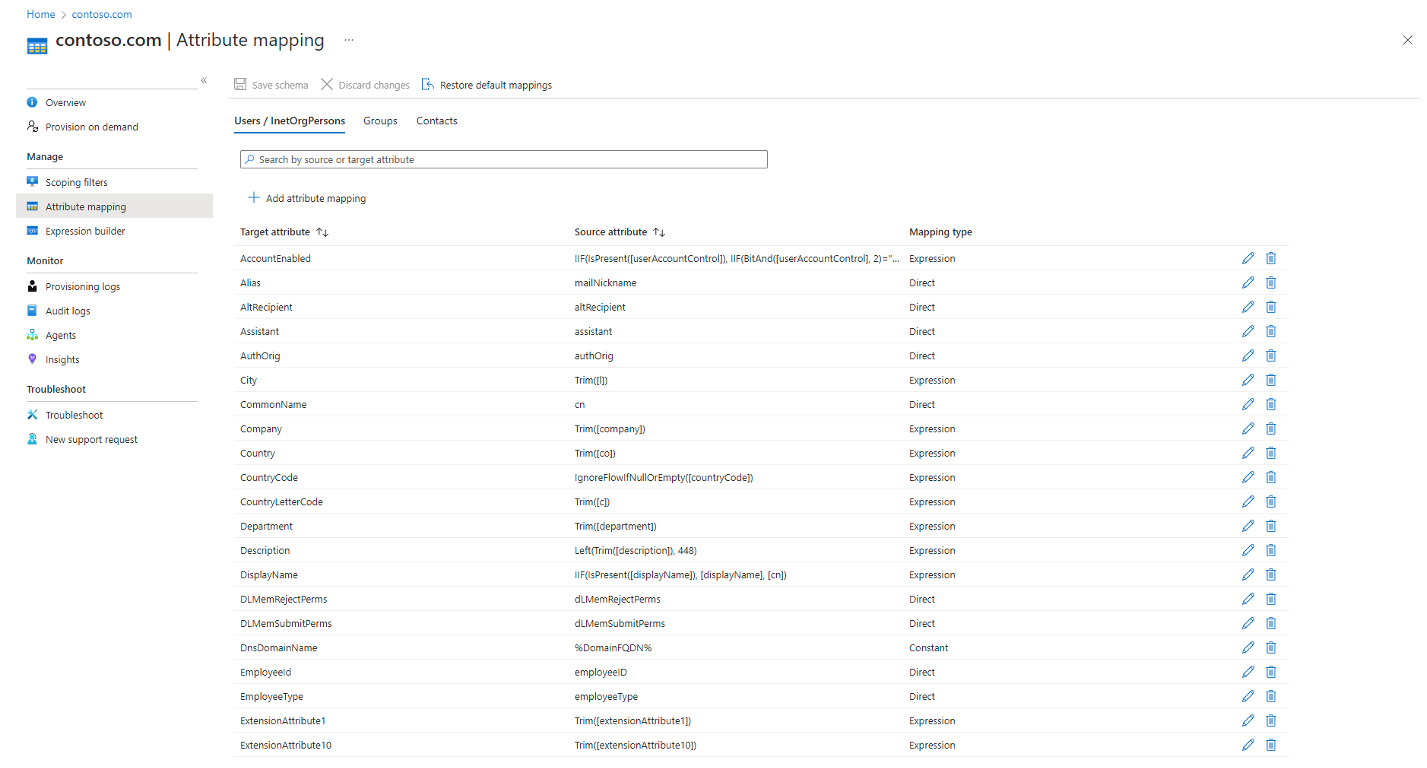
- Email.
- A custom attribute.
- SNAME.
- Another domain-specific identifier.
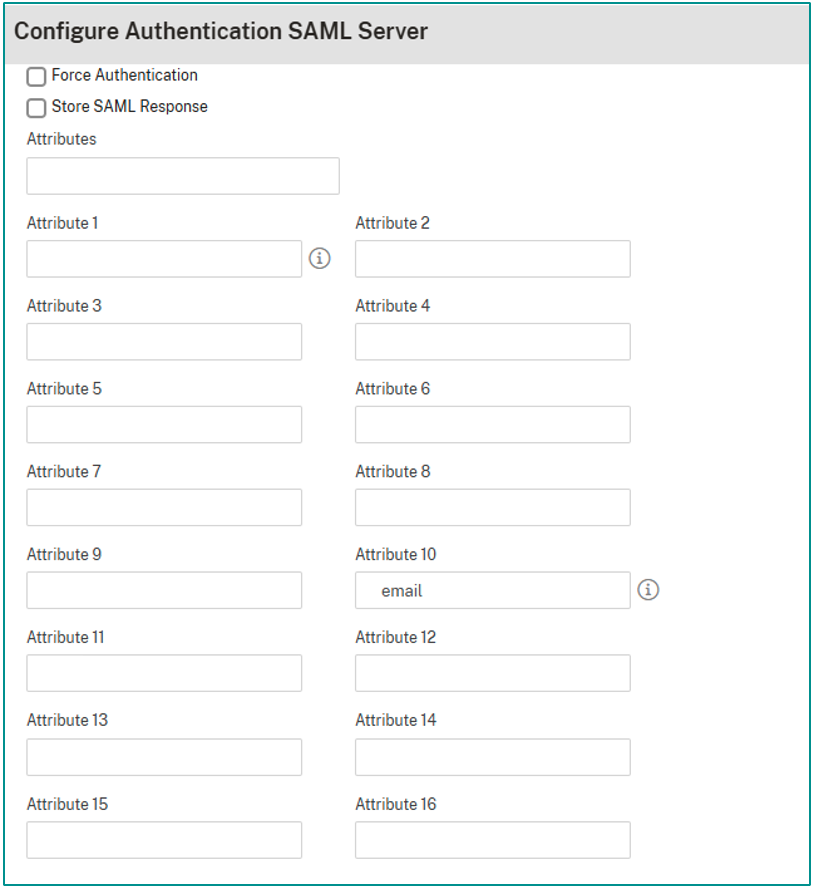
Since many users shared similar login formats across domains, attribute configuration became essential for distinguishing identity context correctly.
StoreFront Session Policies
Finally, StoreFront session policies were configured per domain to ensure correct SSO (single sign-on) domain alignment. An example expression used:
HTTP.REQ.HEADER("User-Agent").CONTAINS("CitrixReceiver").NOT &&
AAA.USER.ATTRIBUTE("5").SET_TEXT_MODE(IGNORECASE).CONTAINS("@domain1")
This expression evaluates:
- That the client is not Citrix Receiver (if required).
- That attribute 5 contains a specific domain identifier.
- Ignores case sensitivity.
Session profiles were then bound to the Gateway vServer accordingly.
Lessons Learned
After implementing and validating the architecture, several key observations and practical lessons emerged that may help others designing similar multi-domain authentication environments.
- Authentication routing must occur before SAML execution.
- Separate SAML actions simplify multi-tenant architecture.
- Converging at a unified AAA processing layer reduces operational complexity.
- Traffic Policy is preferable to Rewrite for identity steering.
- StoreFront enumeration depends upon precise identity formatting.
- Documenting the identity flow prevents troubleshooting confusion.
In Conclusion
This architecture demonstrates that organizations with multiple AD domains and multiple Microsoft Entra ID tenants do not need multiple NetScaler Gateways. By separating authentication routing from authorization and identity processing, the design maintains tenant isolation while centralizing AAA logic, which results in the following:
- One unified Gateway.
- Clean identity steering.
- Consistent session handling.
- No AD restructuring.
- No Entra tenant consolidation.
- Scalable and maintainable identity routing.
This model is architecturally sound and highly adaptable for environments with domain sprawl and/or complex identity patterns. If you are interested in added support unifying your domain sprawl, give our experts a call. We are happy to help.