

Persistent virtual desktops are often selected because users need more than a standard, non-persistent experience. They may require locally installed applications, retained configuration changes, or a level of personalization that has traditionally been tied to a specific virtual machine. The trade-off is that this persistence can make desktop pools more difficult and expensive to manage, particularly when each desktop must be patched, maintained, protected, and retained as an individual asset.
For organizations looking to modernize these environments without giving up the personalization users depend on, Citrix User Personalization Layer (UPL) offers another approach. In this article, we’ll look at how UPL can help address some of the challenges associated with traditional persistent VDI.
What is Citrix User Personalization Layer (UPL)?
UPL is a writable elastic layer powered by Citrix App Layering technology. It captures and persists user customizations – including locally installed applications, data, and settings across sessions on non-persistent desktops.
When a user logs in, their personal VHD-based layer (stored on a file share) mounts automatically as a virtual hard drive (often visible as “UserLayerVolume”). The contents are merged into the user’s desktop environment with applications, registry changes, and user data available transparently. Changes go to this layer rather than the base image. On logoff, the layer detaches cleanly. The next time the user connects (to any single session machine in the pool), their layer reattaches, providing seamless continuity.
UPL is not a full App Layering deployment. It’s a lightweight, native feature in Citrix Virtual Apps and Desktops that requires no app layering infrastructure – just an SMB file share.
UPL Use Cases
UPL is a strong fit when:
- Users genuinely need to install approved applications;
- Desktops can remain pooled and non-persistent;
- Applications do not require unsupported drivers or network-stack changes;
- The organization wants common image management without eliminating user flexibility.
UPL Disqualifiers
- Users require boot-time drivers, VPN clients, antivirus products, printer drivers, or other unsupported software in their personal layer;
- Desktops are multi-session;
- Application delivery can be solved more cleanly through the base image, application layering, application packaging, or published applications;
- The organization cannot provide highly available, appropriately sized SMB storage.
What Are The Key Benefits for Organizations Previously Relying on Persistent VDI?
Many organizations defaulted to persistent VDI (e.g., via MCS full clones) to give users the ability to install apps and retain customizations. This led to VM sprawl, higher storage consumption (each desktop accumulates its own OS and user data), and time-consuming individual patching.
UPL Changes The Equation:
- Single Image Management: Update and patch one golden image, then roll the updated image across the pooled catalog through the normal MCS or Citrix Provisioning lifecycle. Changes apply to all non-persistent machines instantly. No lengthy PvD inventory processes.
- Reduced Storage Costs: Base images are shared; only user layers consume unique storage. Layers are VHD/VHDX files on a central SMB share.
- Persistent User Experience: Users install apps, save files, and customize (desktop icons, settings, etc.) as if it were a dedicated desktop. Layers support modern Windows 10/11 and attach quickly.
- Simplified Scaling and Maintenance: Ideal for pooled-random or pooled-static catalogs. Better suited for cloud/hybrid environments. No need for full persistent VM management tools. For Azure-hosted catalogs, a supported Azure Files configuration can centralize user-layer storage, subject to Citrix’s operating-system, identity, SMB, capacity, and performance requirements. Cost savings can be realized in Azure i.e. using Azure Files Premium share for VHDX files instead of persistent machines with managed disks per VM.
- PvD Replacement: UPL is the modern successor to the older Personal vDisk (PvD), with improved performance, real-time attachment, and broader support.
In short, UPL allows IT to deliver the best of both worlds: operational simplicity of non-persistent VDI with the personalization requirements that users demand.
Configuring UPL
UPL is not separate infrastructure software; it is a VDA option + SMB Share + Citrix Studio Policy.
Setup is straightforward and integrates directly with Citrix Studio. (On-premises or DaaS). See the Citrix Edocs for additional information here.
- Prepare the Master Image:
- On a Windows 10 or 11 single-session desktop (LTSC or Non-LTSC) e.g. Windows 11 26H1 or 24H2, install the Virtual Delivery Agent (VDA) version 2507 CU1 LTSR or the current version 2603 as of this writing.
- During VDA installation, select the Citrix User Personalization Layer component.
- Create a Non-Persistent Machine Catalog:
- Use Machine Creation Services (MCS) or Citrix Provisioning.
- Choose Pooled (random or static) — do not use persistent catalogs or session hosts (multisession) with UPL. Note: Server OS’s are only supported if configured for use as a single session host.
- Configure Policies in Citrix Studio:
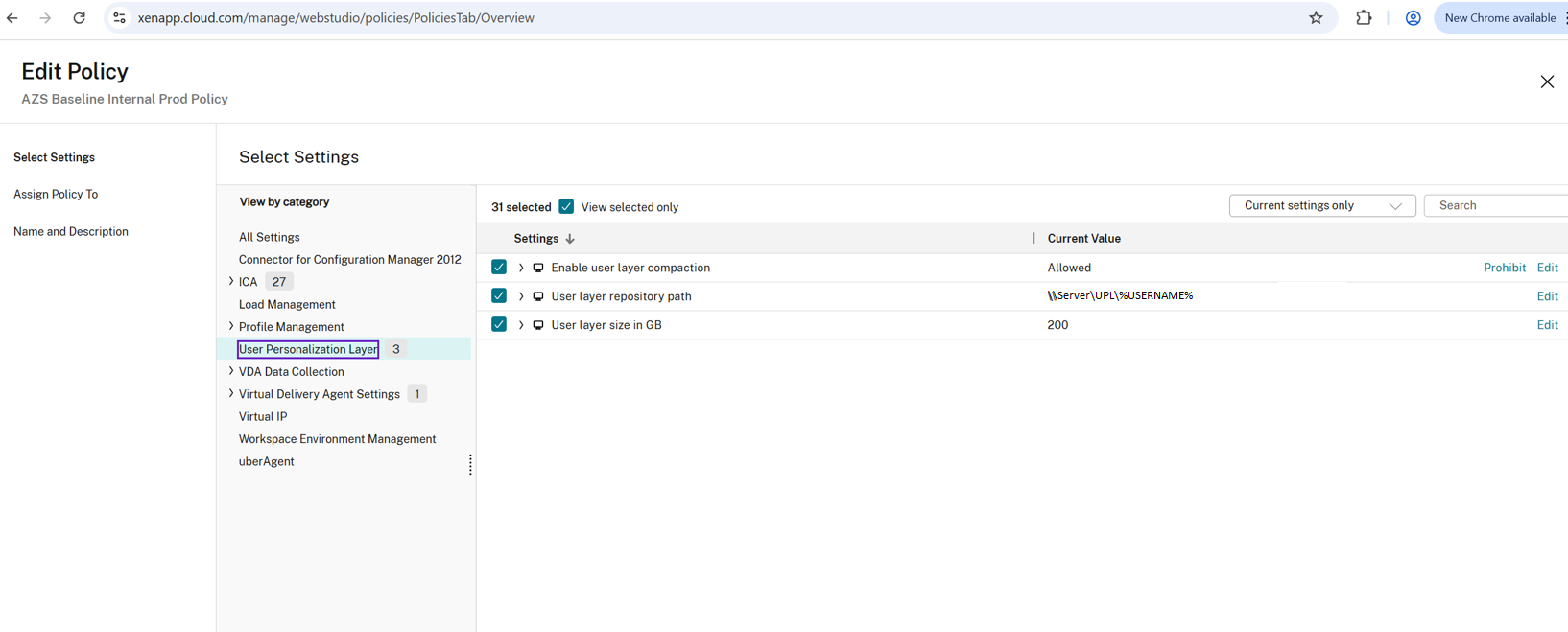
- Create or edit a policy and navigate to Computer Settings > User Personalization Layer.
- User Layer Repository Path: Set to an SMB share (e.g., \\server\share\UPL\%Username%). Use a highly available file share with good network performance and sufficient capacity. Permissions should be managed via Active Directory.
- User Layer Size in GB (optional): Default is 10 GB if set to 0. Adjust based on expected user app installations (e.g., 10–200 GB).
- Assign the policy to the relevant Delivery Group.
- Test:
- Log in as a user, install an application (e.g., Notepad++), create desktop shortcuts/files.
- Log off, then log in to a different machine in the pool. Changes should persist. Check for the mounted UserLayerVolume disk.
UPL is for user installed apps. Applications such as office, enterprise apps, AV, Drivers and VPN, Profile data do not go in the UPL container. These are typically installed in the base image or container for profiles (i.e. UPM/FSLogix).
Tips and Best Practices
- Storage Planning: Monitor layer growth. Use file server/NAS tools for backups. Consider deduplication or quotas.
- Exclusions: Some directories (e.g., certain SCCM or temp paths) may need exclusion from the layer via registry tweaks for stability. Review Citrix-documented exclusions and application-specific compatibility requirements before introducing changes to layer behavior.
- Antivirus and Performance: Antivirus scanning can slow layer mounting. Tune exclusions or real-time scanning policies.
- Monitoring: Use UPL logs, Citrix monitoring tools, Windows event data, and storage-platform monitoring to investigate attachment failures, logon impact, and repository consumption.
- Migration: No direct PvD-to-UPL migration. Manually copy user data where needed.
- Scaling: Start with a POC to validate sizes and performance. Combine with Citrix Profile Management for optimal results.
- Troubleshooting: An administrator can copy and mount the VHDX file to troubleshoot issues inside the UPL disk. Note: the file is always locked when the user is logged in.
Key Takeaways
Citrix User Personalization Layer remains a practical option for organizations that need to preserve user-installed applications and personalization without tying that experience to a single persistent desktop. By separating user-specific state from the underlying machine, UPL can help simplify image management, improve desktop recoverability, and provide greater flexibility in how assigned and non-persistent desktop pools are operated.
UPL is not the right fit for every workload, but it is a mature capability that is often overlooked when organizations evaluate persistent VDI strategies. For environments where users require a personalized desktop experience but IT wants to reduce the operational dependency on individually maintained virtual machines, it is well worth considering as part of the overall design.
As with any personalization technology, the best results come from validating application compatibility, storage performance, user-layer sizing, and operational requirements in a representative test environment before broader deployment. For current requirements and configuration guidance, refer to the official Citrix documentation on User Personalization Layer.
For assistance with this or any other Citrix feature please Reach out to our experts to get started.


