

Citrix hosting advanced settings play a critical role in controlling how infrastructure resources are consumed during Machine Creation Services (MCS) operations. However, their real-world behavior, particularly during image updates, may not always exactly align with Citrix documentation.
These settings directly influence the pacing, concurrency, and overall impact of image updates on the underlying hypervisor platform. While Citrix documentation provides a baseline understanding of these parameters, their real-world behavior, especially at scale, may not always align with expectations.
This article focuses on advanced hosting connection settings for VMware vSphere environments. While many of the concepts may also apply to other hypervisors, the available settings and their behavior can vary depending on the underlying platform.
By default, Citrix configures these settings conservatively to reduce the risk of overloading VMware vCenter. Machine Creation Services (MCS) can generate a significant number of hypervisor operations during machine provisioning, image updates, power actions, and large-scale VDA reboots. For this reason, it is important to understand how the advanced hosting connection settings control the rate and concurrency of these operations.
These settings should not be adjusted without first validating their impact in the target environment. Proper tuning becomes particularly important in large Citrix deployments containing thousands of VDAs on dedicated or shared vCenter instances, where the default values may unnecessarily limit MCS throughput. When tuned appropriately, advanced hosting connection settings can improve the speed at which MCS performs provisioning, image management, and power-management operations while still maintaining acceptable load on the vCenter infrastructure.
This blog explores these settings in detail, focusing on how they influence MCS image update execution and concurrency in a non-persistent, single-session Citrix VDA environment.
Background: MCS Update Process
Before diving into the specific configuration settings and their impact, it’s important to first understand the MCS image update process for a non-persistent, single-session VDA machine catalog. During an image update, administrators are presented with two rollout options:
- Upon next shutdown (not right now)
- Immediately (shut down and restart the machine now)
With the first option, only Citrix VDAs without active user sessions are updated immediately, whereas VDAs with active sessions are deferred until users log off and the machines become available. In contrast, selecting the second option forces an update across all VDAs, regardless of active user sessions.
In both scenarios, Citrix DaaS issues a sequence of commands to each VDA: shutdown, reconfigure, and start up. This sequence is key to understanding the update behavior. Citrix waits until all eligible VDAs have completed the shutdown phase before proceeding with the reconfiguration step. VDAs with active sessions are excluded from this phase until they become available. Once reconfiguration is complete, a startup command is issued to the hypervisor.
This behavior highlights the importance of having multiple machine catalogs delivering identical VDAs to maintain service availability during updates. It also underscores the significance of hosting configuration, as it directly controls the pacing and concurrency of the update process.
Understanding this workflow is essential, as hosting configuration settings directly influence how quickly and safely these steps can be executed at scale.
Citrix Hosting Advanced Settings
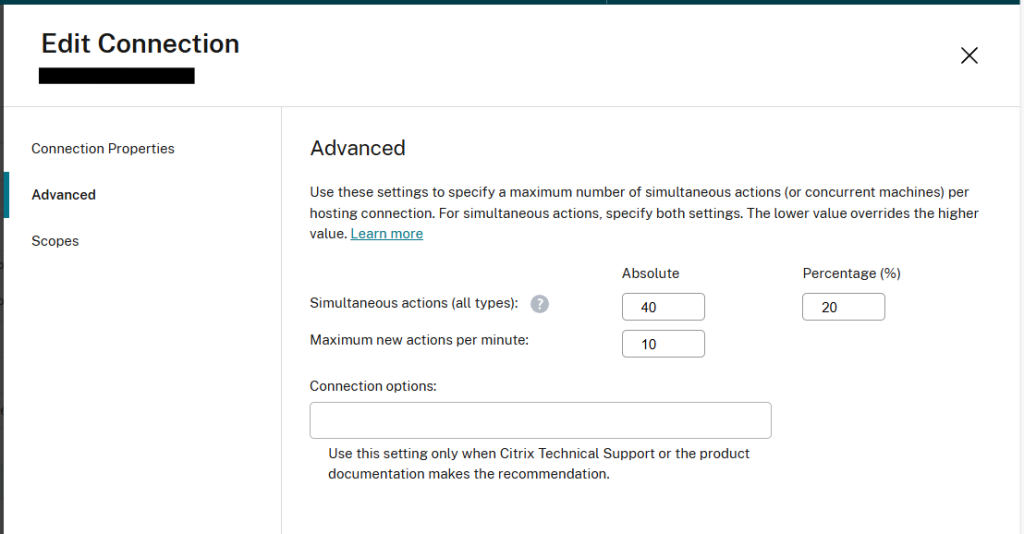
The default values for hosting advanced settings are shown below.
According to Citrix documentation:
- The Simultaneous actions (all types) settings specify two values: a maximum absolute number that can occur simultaneously on this connection, and a maximum percentage of all machines that use this connection. An administrator must specify both absolute and percentage values. The actual limit applied is the lower of the values.
- The Maximum new actions per minute is an absolute number. There is no percentage value.
Expected vs. Observed Behavior
Following the statement from the Create and manage connections and resources | Citrix DaaS™ Citrix article, Advanced settings were configured as shown in the following image.
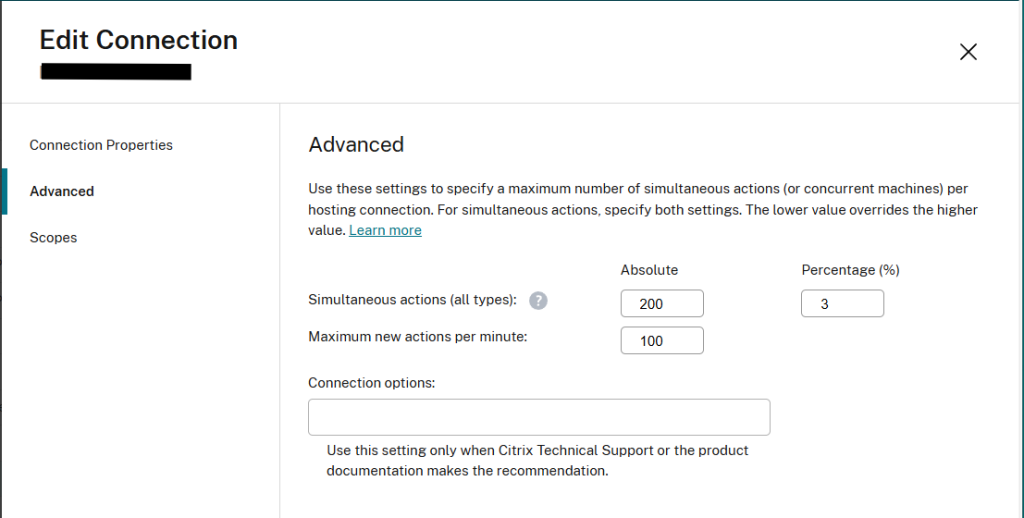
Based on the configured values, the expected behavior per the documentation was a rate of 100 actions per minute (i.e., Citrix issuing shutdown commands to 100 VDAs per minute), with a maximum of 150 VDAs (5% of 5,000) processing the action concurrently.
However, the observed behavior differed significantly, with only six (6) VDAs performing the action at any given time.
Key Finding
This indicates that the percentage-based limit is not calculated against the total number of VDAs in the catalog. Instead, it is applied to the configured absolute concurrency value. Testing across multiple combinations of percentage and absolute limits consistently produced results wherein effective concurrency matched the percentage of the defined absolute value, rather than the overall catalog size.
After understanding the interaction between absolute and percentage limits, the next step was to determine how aggressively the environment could be scaled without introducing hypervisor bottlenecks.
The configuration shown below provided an optimal balance between update speed and infrastructure stability.
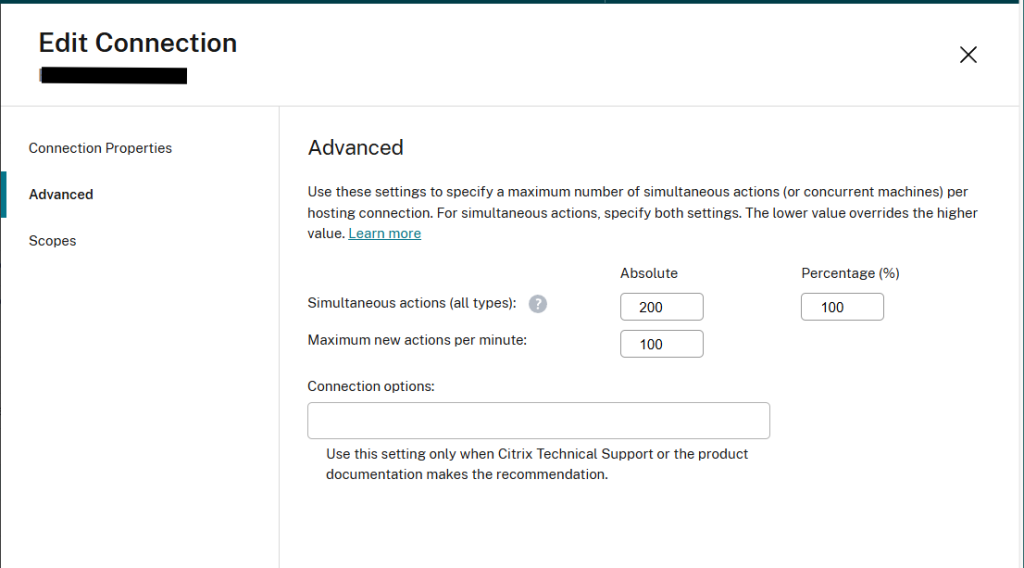
With the configurations below, machine catalog updates were completed efficiently while maintaining stable hypervisor performance and avoiding resource contention:
- Simultaneous actions – Absolute: 200
- Simultaneous actions – Percentage: 100
- Maximum new actions per minute: 100
Practical Implications
This behavior has important implications for large-scale environments:
- Expected concurrency may be significantly lower than calculated.
- Update duration may increase if limits are misunderstood.
- Proper tuning requires validation through testing, not just documentation.
Tuning MCS Updates in Practice
Citrix hosting advanced settings play a critical role in controlling the pacing and concurrency of MCS image updates. While Citrix documentation provides a baseline understanding, real-world behavior may differ, particularly in how concurrency limits are calculated.
This testing demonstrates that percentage-based limits appear to be applied to the configured absolute value rather than to the total catalog size, which can significantly impact update performance at scale.
As a result, administrators should validate these settings within their own environments and avoid relying solely upon documented behavior. Proper tuning requires iterative testing to balance update speed with hypervisor capacity and overall system stability. If you need help validating or tuning MCS hosting advanced settings in your environment, give our experts a call. We would be happy to help.


