

A few weeks ago, while working through routine out-of-band management hardening on a NetScaler MPX 16000, I ran into a problem that turned out to be more interesting than it had any right to be. The web GUI’s account management page had already been giving us trouble — attempts to add a new user via web GUI were failing, even after applying the latest available BMC firmware update. So we fell back to ipmitool via the CLI to create the account directly. That’s where things got stranger: an account I created showed up perfectly in the CLI, but it didn’t exist at all as far as the web GUI was concerned.
The Setup
Every NetScaler MPX appliance has a Baseboard Management Controller (BMC) — the out-of-band chip that lets you power-cycle, remote-console, and manage the appliance even if/when the NetScaler OS itself is unresponsive. Like most enterprise BMCs, it exposes two separate interfaces to the same underlying account data: an ipmitool-driven CLI over LAN, and a Redfish-backed web GUI for day-to-day administration.
As part of standard practice, a secondary administrative BMC account (alongside the factory-default nsroot account) was created directly via ipmitool:
ipmitool user set name 3 <username>'
ipmitool user set password 3 '<password>'
ipmitool user priv 3 4 1
“ipmitool user list” confirmed it: ID 3, name populated, privilege limit ADMINISTRATOR. By every indication, the account existed and was ready to use.
The Problem
Unfortunately, the account was not ready to use. The web GUI’s Account Services page showed only two users — Anonymous and nsroot. The new account, <custom_admin>, simply wasn’t there, and login attempts with it failed outright. Re-running “user list” from the CLI consistently insisted the account was fine. Two tools, two different realities, same NetScaler appliance.
Digging In
The first useful lead came from comparing “ipmitool channel getaccess 1 <id>” output between nsroot and custom_admin side by side, rather than trusting the summary view from “user list”. Two differences stood out:
- Privilege Level on the channel table read “Unknown” for custom_admin, despite “user list” reporting ADMINISTRATOR.
- IPMI Messaging was disabled for custom_admin, whereas it was enabled for nsroot.
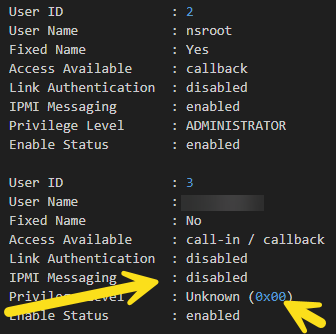
That was the key insight: “user list” reports a summary privilege value, but the web GUI and its underlying Redfish AccountService actually authenticate against the per-channel access table — a separate structure that “ipmitool user priv” doesn’t reliably populate on its own. The account existed in the general user database, but it was never properly wired into the channel-level permissions that govern real logins.
The Fix
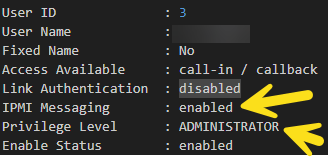
One command resolved it: setting privilege, call-in access, and IPMI messaging explicitly at the channel level:

Even though it was showing as enabled, we ran an enable command as well to ensure that the account was ready for use.

Immediately after running this command, the GUI populated custom_admin correctly — full Administrator badge, Redfish/IPMI indicator, working login. No BMC reboot, no firmware reflash, no support ticket needed to get there.
Why This Matters
The lesson here isn’t really about ipmitool syntax — it’s a reminder that “the CLI says it’s there” and “it actually works” are two different claims whenever a system exposes more than one management interface backed by the same data. BMCs are a classic example: IPMI’s LAN protocol and Redfish’s REST API are meant to be two windows into one account store, but in practice, different write paths don’t always populate every table from which a given interface reads.
If you manage BMC users on Citrix NetScaler MPX appliances (or frankly any MegaRAC-based BMC) via CLI, it’s worth making “channel setaccess” — not just “user priv” — a standard part of your account-creation runbook. Verify with “channel getaccess” on both the account you just built and a known-good account like nsroot, and don’t consider the job done until both interfaces agree.
In Conclusion…
We’ve turned this into an internal runbook item at Ferroque, and we’re still working with Citrix Support on a related, separate issue — the GUI’s “Add User” button remaining greyed out even with open user slots and full Administrator privileges. That one’s still open, and a good reminder that not every symptom on a shared-backend system has the same root cause.
Update: We now have the fix. It involves checking, changing, and re-verifying the BMC’s lockdown mode:
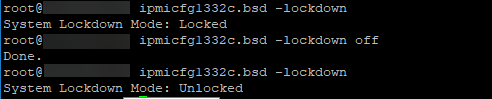
This then enabled the adding of users from the GUI, properly managing the BMC, etc.
Issues like this are a good reminder that even small infrastructure details can have unexpected operational impacts. At Ferroque Systems, we work with organizations every day to design, implement, and support Citrix, NetScaler, and EUC environments. If you’re running into similar challenges or simply want a second set of eyes on your environment, we’d be happy to help.


