

In Part I, we established that one of the clearest indicators of authentication modernization debt is the continued presence of password-centered access flows. These may appear in internal applications, VPN or VDI workflows, administrative tools, onboarding processes, Helpdesk recovery, shared workstations, or legacy applications that still treat username and password as sufficient proof of identity.
In part II, we focus on what comes next.
Once those flows are visible, organizations need to decide how to modernize them. That decision should not begin with a single authentication method. It should begin with the access flow itself.
The common mistake is to ask, “Which authentication method should we deploy everywhere?”
A better question is, “Which authentication method is appropriate for this user, this device, this application, this risk level, and this access flow?” (i.e., which authentication method is appropriate for the use case/scenario).
That distinction matters because authentication scenarios are not interchangeable; for example:
- A remote new hire may need a secure way to register passwordless credentials for the first time.
- A mobile-first user may need a simple and supportable passwordless sign-in experience.
- A managed Windows user may be a strong candidate for Windows Hello for Business.
- A shared workstation user may need portable phishing-resistant authentication.
- A privileged administrator may require stronger assurance than a standard user accessing a low-risk application.
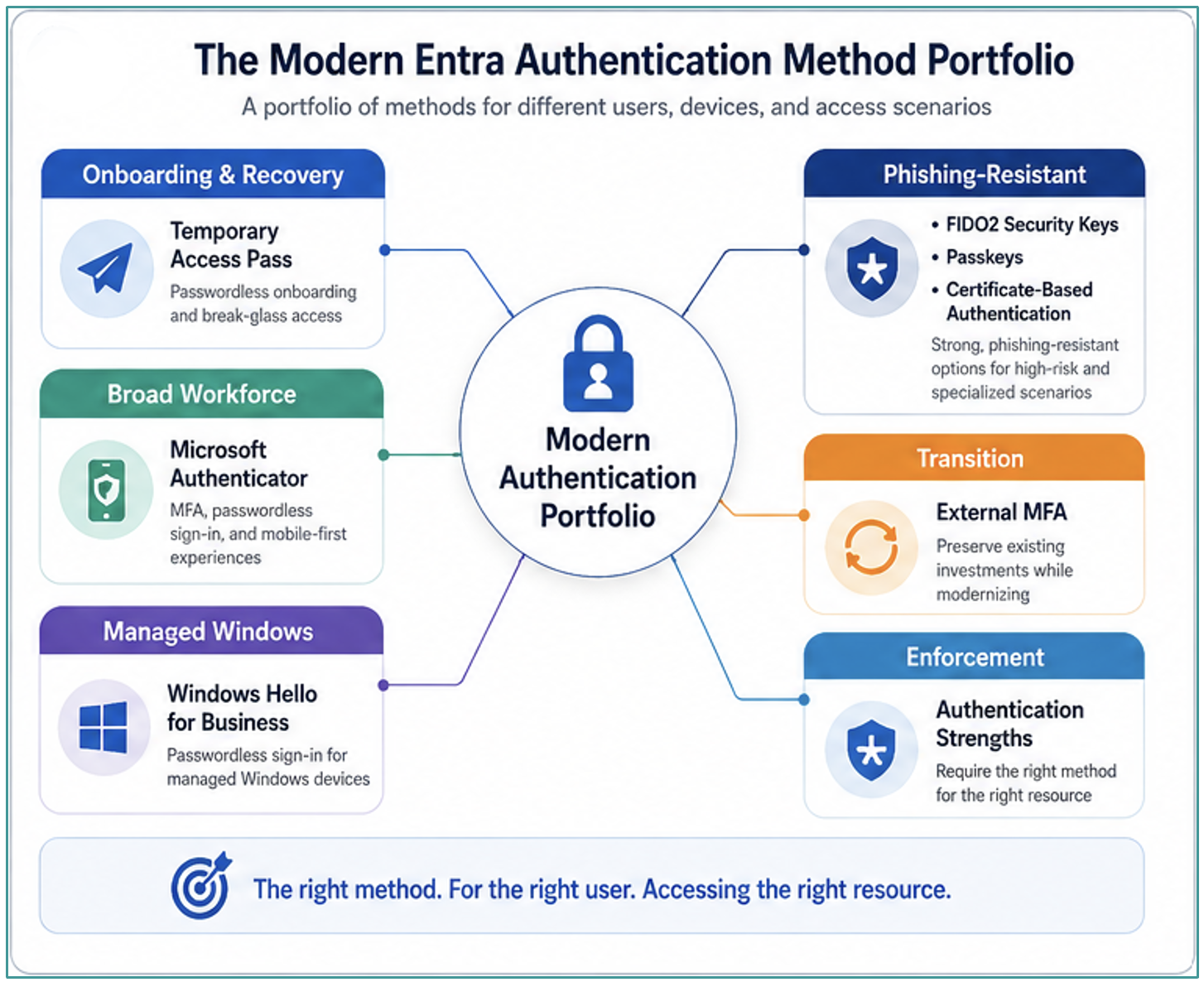
Modern Microsoft Entra authentication provides a portfolio of methods that can support those different scenarios. The value is in intentionally matching each method to the authentication flows where it provides the strongest combination of security, usability, governance, and operational fit.
- Temporary Access Pass can help modernize onboarding and recovery.
- Microsoft Authenticator can support broad adoption and transitional passwordless experiences.
- Windows Hello for Business can strengthen managed Windows sign-in.
- FIDO2 security keys and passkeys can move organizations toward phishing-resistant authentication.
- Certificate-based authentication can support high-assurance scenarios.
- External MFA can help preserve existing investments during transition.
- Conditional Access authentication strengths can enforce the right method for the right resource.
The purpose of this blog is to introduce the methods from the portfolio and frame where each method fits. The goal is to reduce the number of important places where passwords still matter and begin replacing password-centered flows with stronger, more intentional authentication models.
Modernize the Flow Before Selecting the Method
Authentication modernization should begin with the access flow, not the authentication factor.
It is tempting to start with the authentication method. Should the organization deploy Microsoft Authenticator? Windows Hello for Business? FIDO2 security keys? Passkeys? Certificate-based authentication? Should it preserve an existing external MFA provider? Should it begin enforcing authentication strengths through Conditional Access?
Those are important questions, but not the first.
The first question is: what access flow are we trying to modernize? Consider the following scenarios:
- A new user onboarding for the first time has a different need than an existing user completing a normal daily sign-in.
- A lost-device recovery process has a different risk profile than a managed Windows sign-in.
- A shared workstation scenario has different constraints than a mobile-first user.
- A privileged administrator accessing identity policy should not be treated the same as a standard user accessing a low-risk application.
Those differences matter because each flow has different requirements.
Some flows need a secure bridge into credential registration. Some need low-friction daily sign-in. Some need portability. Some need phishing resistance. Some need to work where phones are not appropriate. Some need to support users who move between shared devices. Some need to preserve an existing third-party MFA investment while the organization transitions. Some need to compensate for legacy applications that cannot yet fully participate in modern identity policy.
This is why modern authentication should be treated as a portfolio, not a single standard.
A good authentication strategy should answer several questions:
- Who is the user?
- What device are they using?
- What application or resource are they accessing?
- How sensitive is the resource?
- Is this a normal sign-in, a registration event, a recovery event, or a privileged action?
- Does the flow require phishing-resistant authentication?
- Does the method need to support shared workstations, phone-restricted users, or remote onboarding?
- Can the method be governed, supported, and recovered operationally?
Once you answer those questions, the decision about the appropriate method becomes clearer.
For example, Temporary Access Pass may be appropriate for onboarding and recovery, but it is not intended to be a user’s everyday authentication method. Windows Hello for Business may be appropriate for managed Windows endpoints, but it may not solve shared workstation or phone-restricted scenarios. FIDO2 security keys may be excellent for administrators and shared workstations, but they require planning around procurement, registration, backup, and recovery. Passkeys may help expand phishing-resistant authentication to broader populations, but organizations still need to understand device support, synchronization behavior, and policy requirements.
Rather than force every user into the same experience, the goal is to understand each access flow, classify the risk, and apply the authentication method that best balances security, usability, governance, and operational fit.
There are a few solution options. In this next portion, learn about each of these methods:
- Temporary Access Pass: The bridge to Stronger Authentication
- Microsoft Authenticator: Broad Adoption and Transitional Value
- Windows Hello for Business: Managed Windows Passwordless Sign-In
- Fido2 Security Keys: Portable Phishing-Resistant Authentication
- Passkeys: Making Phishing-Resistant Authentication More Approachable
- Certificate-Based Authentication: Specialized High Assurance Scenarios
- External MFA: Transition Without Standing Still
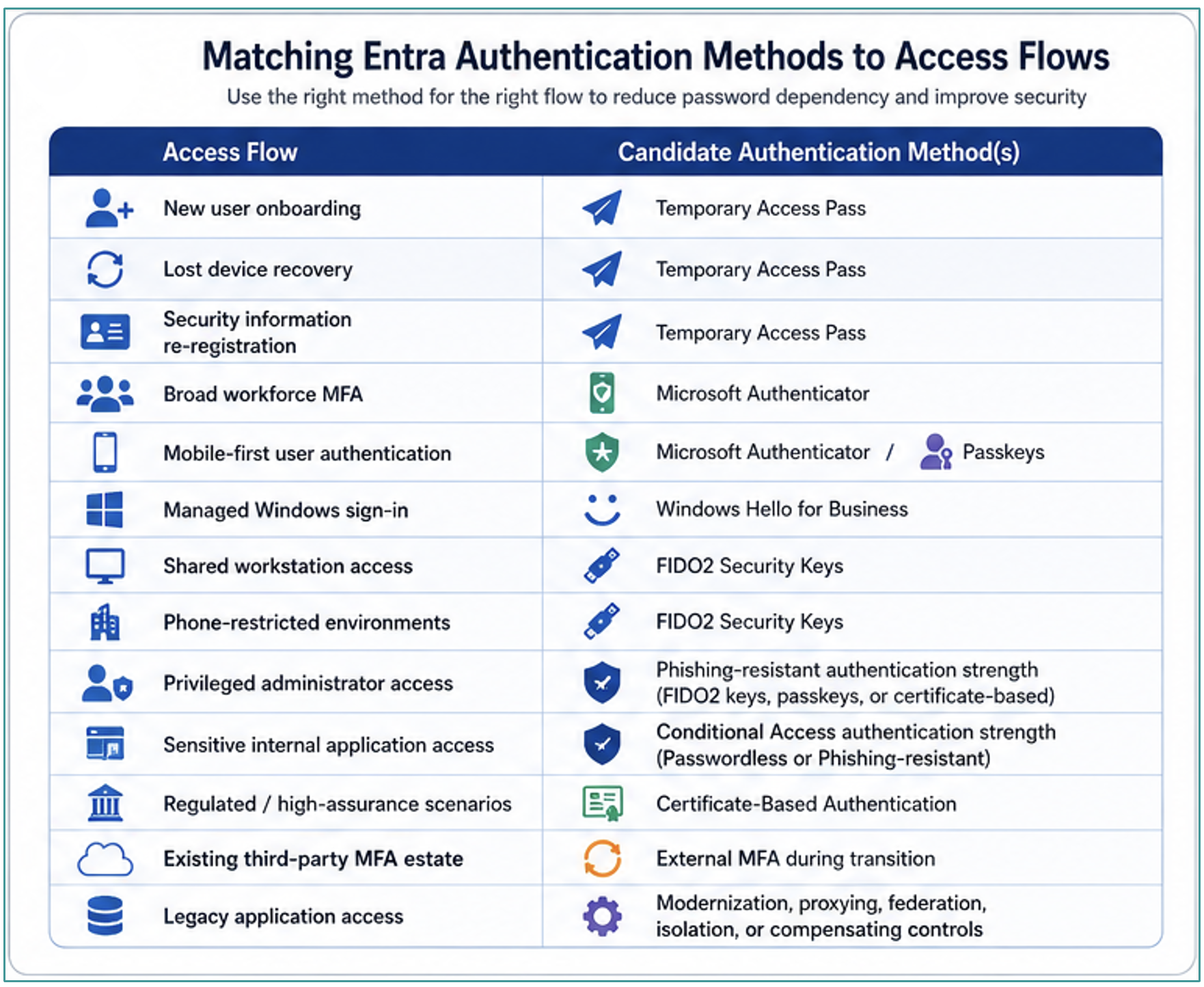
Method to Flow Mapping
The value of a modern authentication portfolio is not that every method is enabled for every user; rather, the value is that each method can be matched to the Access flows where it makes the most sense.
A practical starting model may look like this:
This table should be treated as a design model instead of as a universal prescription.
Every organization still needs to account for licensing, platform readiness, user experience, application compatibility, endpoint management maturity, Helpdesk readiness, and risk tolerance. The right answer for a healthcare shared workstation may be different from the right answer for a financial services administrator. The right answer for a managed Windows knowledge worker may be different from the right answer for a mobile-first contractor.
The important point is to stop treating authentication modernization as a single-method decision. Instead, organizations should build a governed authentication method portfolio that defines which methods are allowed, which users can register them, which methods satisfy baseline MFA, which methods are considered passwordless, and which methods are required for phishing-resistant Access.
This also helps with communication. Rather than telling the organization, “We are deploying a new authentication method,” identity teams can explain the modernization in practical terms regarding access flows:
- We are modernizing onboarding and recovery with Temporary Access Pass.
- We are moving managed Windows users toward Windows Hello for Business.
- We are using FIDO2 security keys where portable phishing-resistant authentication is required.
- We are evaluating passkeys for broader passwordless and phishing-resistant adoption.
- We are using authentication strengths to require stronger methods for sensitive and privileged Access.
Temporary Access Pass: The Bridge to Stronger Authentication
Temporary Access Pass is one of the most important tools in a passwordless modernization strategy because it addresses a practical problem: how does a user get into stronger authentication in the first place?
Many organizations still depend upon password-centered onboarding and recovery flows. A new user receives a temporary password. A remote employee signs in with that password and registers MFA. A user who loses a phone calls the Helpdesk, passes some form of verification, and receives a password reset. The organization may have MFA in place, but the password remains the bootstrap credential and the recovery anchor.
That pattern keeps passwords operationally central, but Temporary Access Pass changes the flow.
For example, instead of resetting a password and sending the user back through a traditional password-based process, the organization can issue a time-limited passcode that allows the user to sign in and register via stronger authentication methods. Used properly, TAP becomes a controlled bridge into passwordless registration rather than another long-lived credential users rely upon every day.
This makes TAP especially relevant for:
- New user onboarding.
- Remote onboarding.
- Lost-device recovery.
- Passwordless registration.
- Security information re-registration.
- Helpdesk-assisted recovery.
The value of TAP is not only technical, but it is also operational.
A strong passwordless program needs a safe way to onboard users, recover users, and re-establish trust when an authentication method is lost or replaced. If every recovery path falls back to password reset, then passwords remain at the center of the identity model. TAP gives organizations a way to move users into stronger methods without treating the password as the universal recovery mechanism.
A modernized recovery flow might look like this:
- The user’s identity is verified.
- A Temporary Access Pass is issued.
- The user signs in with the TAP.
- The user registers a stronger authentication method.
- The TAP expires.
- Conditional Access enforces the required authentication method in the future.
That is a very different pattern than resetting a password and hoping the user completes registration correctly.
TAP should still be governed carefully. Organizations need to define who can issue it, what identity proofing is required before issuance, how long it remains valid, whether it can be used once or multiple times, how issuance is audited, and how exceptions are handled.
Temporary Access Pass is not the destination, but it is the bridge that helps users get to the destination.
Microsoft Authenticator: Broad Adoption and Transitional Value
Microsoft Authenticator is often one of the most familiar authentication methods in enterprise environments because many organizations already use it for MFA. Users may already recognize the app, help desks may already support it, and Identity teams may already have policies and reporting built around it.
When organizations begin moving away from password-centered access flows, user adoption and operational readiness become just as important as technical capability. A method that is already broadly deployed can provide a practical bridge between traditional password-plus-MFA patterns and stronger passwordless experiences.
However, Microsoft Authenticator should not be viewed only as a push notification tool.
If Authenticator is used only to approve a prompt after the user types a password, then the password is still part of the authentication flow. That may be a useful improvement over single-factor authentication, but it should be viewed as a transitional pattern rather than the destination.
The more strategic question is how Authenticator can help reduce password dependency over time.
For many users, especially mobile-first users and broad workforce populations, Authenticator can support a more modern authentication experience. It can participate in passwordless sign-in patterns, support stronger user verification, and serve as part of a broader authentication method portfolio. In environments adopting passkeys, Authenticator may also play a role in helping users move toward phishing-resistant authentication experiences.
This makes Authenticator useful for several access flows:
- Broad workforce MFA adoption.
- Mobile-first user authentication.
- Passwordless sign-in scenarios.
- Transitional movement away from password-plus-prompt patterns.
- Passkey registration and sign-in scenarios.
- User populations where mobile-based authentication is operationally acceptable.
The design consideration is not simply whether Authenticator is enabled; the design consideration is how it is being used.
- Is it being used as a second factor after password entry?
- Is it being used to reduce how often users type passwords?
- Is it being used as part of a broader passwordless strategy?
- Is it appropriate for the user population, device model, and risk profile?
- Is it acceptable in environments where mobile phones are restricted or unavailable?
Microsoft Authenticator can be a strong fit for many enterprise users, but it should still be mapped to the right scenarios. Some users may be better served by Windows Hello for Business, whereas some shared workstation or phone-restricted scenarios may require FIDO2 security keys, and some privileged workflows may require phishing-resistant methods enforced through authentication strengths.
The important point is that Authenticator can help organizations move from basic MFA toward a more modern, passwordless authentication model.
Windows Hello for Business: Managed Windows Passwordless Sign-In
Windows Hello for Business is one of the most important authentication methods for organizations with managed Windows endpoints.
From a user perspective, Windows Hello for Business may look like signing in with a PIN, fingerprint, or facial recognition. From a security and architecture perspective, the value is that the user is no longer relying upon a reusable password as the primary credential for that sign-in experience. The authentication model is based upon stronger credential material tied to the user and device.
That makes Windows Hello for Business a strong candidate for managed Windows users.
This is especially relevant in enterprise environments wherein users already work from corporate Windows endpoints, cloud PCs, virtual desktops, or managed devices that participate in endpoint management and compliance policies. In those scenarios, the endpoint device can become part of the trust decision, but it should not become a reason to relax authentication requirements.
The legacy pattern is that a user is on a corporate device; therefore, username and password are treated as sufficient.
The modernized pattern is that when a user is on a managed device, the device posture is evaluated, and the user authenticates with a stronger passwordless method that participates in the access decision.
That is a meaningful shift.
Windows Hello for Business is a good fit for:
- Managed Windows endpoints.
- Knowledge workers using corporate devices.
- IT staff using managed workstations.
- Users who need low-friction daily sign-in.
- Organizations with mature endpoint management and compliance policies.
- Scenarios where device-bound authentication improves assurance.
It is also useful because it can improve both security and user experience since users are not repeatedly typing passwords throughout the day, and organizations reduce the number of moments where reusable secrets are entered, exposed, cached, or phished.
That said, Windows Hello for Business is not the answer for every access flow.
It may not solve shared workstation scenarios wherein users move frequently between devices. It may not address phone-restricted environments by itself. It may not be the only method needed for administrators or highly privileged users. It also requires planning around device management, provisioning, recovery, user education, and support.
But for managed Windows populations, Windows Hello for Business should be a central part of the authentication modernization conversation. It helps organizations move away from the idea that a trusted corporate endpoint makes passwords acceptable, and toward a model where the endpoint, user identity, device posture, and authentication method all contribute to the access decision.
FIDO2 Security Keys: Portable Phishing-Resistant Authentication
FIDO2 security keys are one of the clearest options for organizations looking to introduce phishing-resistant authentication into high-value access flows.
Unlike password-based authentication, one-time passcodes, or approval prompts, FIDO2 security keys are based on public-key cryptography. The user is not typing a reusable secret into a form or copying a code from one place to another. The private key remains protected by the Authenticator, and the authentication response is bound to the legitimate service.
That distinction matters because many modern attacks are designed to trick users into giving attackers something reusable; for example, a password can be phished, a one-time code can be relayed, a push notification can be approved by mistake, a session can be proxied through an adversary-in-the-middle attack. Phishing-resistant methods are intended to make those attack paths less useful.
FIDO2 security keys are especially relevant for:
- Administrators.
- Privileged users.
- Shared workstations.
- Frontline workers.
- Phone-restricted environments.
- Break-glass or emergency access scenarios.
- Users who need portable phishing-resistant authentication.
FIDO2 may not be the right method for every user, but it is highly relevant where the consequences of compromise are high or where mobile-based authentication is not appropriate.
For example, an administrator accessing identity policy, security tooling, production infrastructure, or privileged management consoles should not be treated the same as a standard user accessing a low-risk productivity application. The authentication method should reflect the sensitivity of the flow; in many cases, that means requiring a phishing-resistant method.
FIDO2 keys can also be valuable in shared workstation environments. In healthcare, manufacturing, retail, operations, and other shift-based scenarios, users may move between endpoints throughout the day. A portable security key can provide strong authentication without depending on a personal mobile device or requiring the user to type a password into shared systems repeatedly.
Operational planning still matters. Organizations need to think through procurement, distribution, registration, backup keys, lost key recovery, user education, support procedures, and exception handling. A strong authentication method can fail operationally if users cannot enroll, recover, or get support when something goes wrong.
That does not reduce the value of FIDO2 security keys. It simply reinforces the core point of this article: authentication method selection must be tied to the access flow and the operating model.
FIDO2 security keys should be part of the authentication method portfolio wherever portable, phishing-resistant authentication is required.
Passkeys: Making Phishing-Resistant Authentication More Approachable
Passkeys are becoming one of the most important developments in enterprise authentication because they make phishing-resistant sign-in more approachable for broader user populations.
Like FIDO2 security keys, passkeys are based on public key cryptography. The user is not typing a password into a website, copying a one-time code, or approving Access based only on a prompt. The private key remains protected by the Authenticator, and authentication is bound to the legitimate service.
This makes passkeys strongly aligned to the direction enterprise authentication needs to move: away from reusable secrets and toward methods that resist phishing, replay, and adversary-in-the-middle attacks.
Historically, phishing-resistant authentication often felt like a specialized control reserved for administrators, regulated environments, or hardware-key deployments. Passkeys are changing that conversation since they create a path for stronger authentication experiences that can be easier for users to adopt and easier for organizations to expand over time.
However, passkeys should not be treated as a single design pattern. Organizations need to understand the differences between device-bound passkeys, synced passkeys, authenticator-based passkeys, and hardware key-backed passkeys. Those models have different security, usability, recovery, and governance considerations.
A device-bound passkey may be appropriate where the organization wants the credential tied to a specific device. A synced passkey may provide a better user experience for broader populations, but requires careful thought around the passkey provider and recovery model. A passkey stored in Microsoft Authenticator may fit mobile-first users and organizations already invested in the Microsoft identity ecosystem. A hardware key-backed passkey may align more closely with privileged or high-assurance access requirements.
This is why passkeys should be mapped to user personas and access flows rather than enabled without a strategy. Passkeys may be a strong fit for:
- Broad passwordless adoption.
- Mobile-first users.
- Managed device populations.
- Users who need a simpler phishing-resistant experience.
- Scenarios wherein user experience is critical to adoption.
- Access flows wherein reducing password dependency is a priority.
They may not replace every other method. FIDO2 security keys may still be preferred for some administrators or shared workstation scenarios. Windows Hello for Business may remain the best fit for many managed Windows users. Certificate-based authentication may still be required in specialized high-assurance environments.
The important point is that passkeys are no longer only a consumer authentication story. They are becoming part of the enterprise authentication method portfolio, and organizations should begin evaluating where they fit. For environments still relying upon passwords internally, passkeys represent one of the most practical paths toward broader phishing-resistant authentication.
Certificate-Based Authentication: Specialized High-Assurance Scenarios
Certificate-based authentication remains an important option in the modern authentication portfolio, especially for organizations with established PKI maturity or regulatory requirements.
Not every organization will use certificate-based authentication broadly, and not every user population is a good fit; however, there are scenarios wherein certificate-backed authentication continues to make sense. Smart card environments, PIV or CAC requirements, regulated industries, high-assurance workstations, and organizations with mature certificate lifecycle management may already have the operational foundation required to support it.
Certificate-based authentication is especially relevant where the organization needs strong assurance around the identity of the user and the device or credential being used. It can help support environments where phishing-resistant authentication is required and where certificate lifecycle, issuance, revocation, and governance are already part of the security operating model.
This makes certificate-based authentication a strong candidate for:
- Regulated environments.
- Smart card, PIV, or CAC scenarios.
- High-assurance authentication requirements.
- Privileged or sensitive access flows.
- Organizations with mature PKI operations.
- Use cases where certificate lifecycle management is already established.
The important caveat is operational complexity.
Certificate-based authentication is not usually the easiest method to deploy broadly. It requires planning around certificate issuance, renewal, revocation, device compatibility, user experience, support, and recovery. If an organization does not already have mature certificate operations, it should be realistic about the effort required to adopt this method at scale.
That does not make certificate-based authentication outdated; rather, it means it should be applied where its assurance value justifies the operational model.
In the context of authentication modernization, certificate-based authentication should be viewed as a specialized high-assurance method. It may not be the default answer for every user, but it remains an important option for organizations that need strong cryptographic authentication and have the governance model to support it.
External MFA: Transition Without Standing Still
Many enterprises already have an external MFA provider. That investment may be mature, widely deployed, and deeply integrated into existing user workflows, Helpdesk processes, and operational runbooks. Authentication modernization does not require pretending those investments do not exist.
External MFA can be valuable during transition.
For organizations that have already standardized on a third-party MFA provider, external MFA can help preserve existing investments while allowing the organization to continue moving toward a more modern identity control plane. This can be especially useful in organizations where users are already trained, support teams are already prepared, and the organization needs to avoid disrupting authentication flows while broader modernization work continues.
External MFA may be relevant for:
- Existing third-party MFA deployments.
- Transitional MFA coverage.
- Organizations not ready to move every user to native methods immediately.
- Environments with operational dependency upon an established MFA provider.
- Phased migration from legacy MFA integrations.
- Scenarios wherein an existing provider remains part of the access strategy.
The presence of an MFA provider does not automatically mean the authentication model is modern. Organizations still need to ask whether the method reduces password dependency, supports phishing-resistant requirements, can satisfy the desired access policy, and helps the organization move away from password-centered flows.
The key questions are:
- Does the method reduce reliance on passwords?
- Is the method resistant to phishing or adversary-in-the-middle attacks?
- Can it support the organization’s Conditional Access strategy?
- Can it be governed consistently?
- Does it improve the user experience or preserve a legacy pattern?
- Does it support the intended direction toward passwordless or phishing-resistant authentication?
External MFA can be part of the answer, especially in environments with existing investments. But it should be treated as part of the transition strategy, not as the final destination by default.
The goal remains the same: reduce password dependency, improve assurance, and require stronger methods where compromise would have the greatest impact.
Authentication Strengths: The Enforcement Layer
Authentication methods define what users can use, whereas authentication strengths define what users must use. This distinction is critical.
Many organizations begin with a simple Conditional Access policy that requires MFA. That is a meaningful improvement over single-factor authentication, but it does not always provide enough precision. If any allowed MFA method can satisfy the requirement, then a weaker method may be accepted for a sensitive access flow.
For example, a standard productivity application, a sensitive internal application, and a privileged administrative role should not necessarily accept the same authentication methods. A one-time passcode and a phishing-resistant credential should not be treated as equivalent for high-risk administrative Access. A push approval and a FIDO2 security key should not be viewed as the same level of assurance.
Authentication strengths help solve that problem. They allow organizations to move from generic MFA requirements toward more intentional enforcement. Rather than simply asking whether the user completed MFA, the organization can require an authentication strength appropriate to the resource, user persona, and risk.
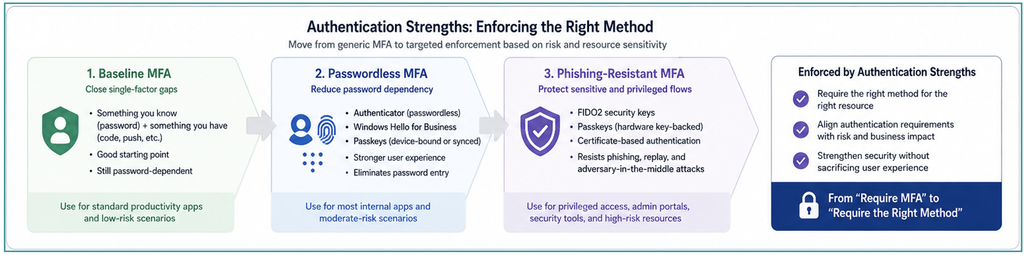
This enables a more mature model:
- Standard applications may require baseline MFA.
- Higher-risk applications may require passwordless MFA.
- Privileged roles may require phishing-resistant MFA.
- Security tools and administrative portals may require phishing-resistant MFA.
- Recovery and registration workflows may require controlled methods such as Temporary Access Pass.
- Legacy applications may require modernization, proxying, isolation, replacement, or compensating controls.
This is where the authentication method portfolio becomes enforceable.
Without authentication strengths, organizations may enable strong methods but fail to require them where it matters most. With authentication strengths, Conditional Access can be used to align method requirements with application sensitivity and business risk.
That is the difference between saying “MFA is enabled” and saying “the right authentication method is required for this flow.”
Authentication strengths should be central to any plan that moves beyond single-factor authentication. They are how organizations begin enforcing passwordless and phishing-resistant authentication in a targeted, practical, and risk-aligned way.
Where to Start
Organizations do not need to deploy every modern authentication method at once. In fact, trying to do everything at once can create confusion for users, Helpdesk teams, application owners, and security operations. A better approach is to choose a small number of high-value flows and prove the modernization pattern.
A practical first phase could include the following steps.
- Review the password-centered flows identified in Part I of this blog series. These may include internal applications, VPN, VDI, administrative tools, shared workstations, onboarding, recovery, security information registration, and legacy applications.
- Group those flows by user persona, device pattern, and application sensitivity. A privileged administrator, a standard knowledge worker, a frontline user, a mobile-first user, and a shared workstation user should not automatically receive the same authentication design.
- Clean up authentication method governance. Organizations should understand which methods are enabled, who can register them, which groups they target, which legacy methods remain available, and which methods are acceptable for baseline MFA, passwordless MFA, and phishing-resistant MFA.
- Select one onboarding or recovery flow to modernize with Temporary Access Pass. This is often a strong starting point because passwordless programs fail when users cannot enroll or recover without falling back to password reset.
- Select one (or a subset of) user population for passwordless sign-in. Managed Windows users may be a strong candidate for Windows Hello for Business. Mobile-first users may be good candidates for Microsoft Authenticator or passkeys. Shared workstation users may be better candidates for FIDO2 security keys.
- Select one privileged or sensitive access flow for stronger enforcement. This could be administrative portal access, identity policy management, security tooling, production infrastructure, financial systems, or a sensitive internal application. The goal is to start requiring stronger authentication where compromise would have the greatest impact.
- Finally, document exceptions. Legacy applications, unsupported platforms, and operational constraints will exist. Make them visible, owned, risk-rated, and on a modernization path. Exceptions should not become permanent simply because they are difficult.
The first phase does not need to eliminate every password; instead, a better first-phase success metric is reducing the number of important access flows where a password is still sufficient.
Tying it Together
Authentication modernization is about building a governed authentication method portfolio and matching that portfolio to real enterprise access flows.
The path forward starts with the flows identified in Part I of this blog series. Once organizations know where passwords still matter too much, they can begin replacing password-centered flows with modern authentication methods that reduce password dependency and improve resistance to phishing, credential theft, password spray, social engineering, and adversary-in-the-middle attacks.
The goal is to make passwords insufficient where compromise would matter most, following a methodical approach (i.e., not trying to remove every password overnight).
Ferroque Systems has decades of experience working with customers of all sizes across a range of industries to design, implement, and support EUC solutions, including designing and implementing appropriate hardening techniques to secure EUC solutions. We would be happy to talk with you about hardening the security of your EUC solution, using some of the techniques discussed in this blog or other traditional techniques based on what is appropriate for your organization.


Leave a Reply